
面板配置
介绍
默认情况下,配置文件位于 app/Providers/Filament/AdminPanelProvider.php。请继续阅读以了解更多关于面板和每个面板的配置文件的信息。
引入面板
默认情况下,当你安装该软件包时,有一个面板已经设置好了 - 它位于 /admin。所有你创建的资源、自定义页面和仪表盘 Widget 都会被注册到这个面板。
不过,你可以创建任意多的面板,每个面板都有自己的资源、页面和 Widget。
比如,你可以创建一个面板,用户可以在 /app 登录并访问面板,管理员可以在 /admin 登录并管理应用。/app 面板和 /admin 面板都有自己的资源,因为每个用户组都有不同的需求。Filament 提供了创建多个面板的能力。
默认管理面板
你运行 filament:install 时,会在 app/Providers/Filament 中创建一个名为 AdminPanelProvider.php 的文件。此文件包含 /admin 面板的配置。
当此文档中提到”配置”时,它指的是你需要编辑的文件。它允许你完全自定义应用。
创建新面板
要创建新面板,你可以使用 make:filament-panel 命令,并传入新面板的唯一名称:
php artisan make:filament-panel app
该命令将创建名为 “app” 的新面板。其配置文件将保存在 app/Providers/Filament/AppPanelProvider.php 中。你可以通过 /app 访问该面板,但如果你不希望这样,你可以自定义路径。
由于该配置文件也是 Laravel 服务提供者,你需要在 bootstrap/providers.php (Laravel 11 和以上版本的应用结构) 或 config/app.php(Laravel 10 和以下版本的应用结构)中注册它。Filament 会尝试完成此过程,但如果尝试访问面板时出现错误,则此过程可能失败了。
修改路径
在面板配置文件中,你可以使用 path() 方法来改变应用的访问路径:
use Filament\Panel;

public function panel(Panel $panel): Panel
{
    return $panel
        // ...
        ->path('app');
}
如果你希望应用无前缀访问,你可以将这个设置为空字符串:
use Filament\Panel;

public function panel(Panel $panel): Panel
{
    return $panel
        // ...
        ->path('');
}
请确保你的 routes/web.php 文件中不包含 '' 或 '/' 路由,因为它们将优先被采纳。
渲染钩子
渲染钩子允许你在框架视图中渲染 Blade 内容。你可以在服务提供者或中间件中注册全局渲染钩子,但你也可以注册特定于某个面板的渲染钩子。要实现这一点,你可以使用面板配置对象上的 renderHook() 方法。以下是一个例子,将 wire-elements/modal 与 Filament 集成:
use Filament\Panel;
use Filament\View\PanelsRenderHook;
use Illuminate\Support\Facades\Blade;

public function panel(Panel $panel): Panel
{
    return $panel
        // ...
        ->renderHook(
            PanelsRenderHook::BODY_START,
            fn (): string => Blade::render('@livewire(\'livewire-ui-modal\')'),
        );
}
可用渲染钩子的完整列表可以在这里找到。
设置域名
默认情况下,Filament 将对所有域名的请求进行响应。如果你想将其限定到指定域名,你可以使用 domain() 方法,与 Laravel 中的 Route::domain() 方法类似:
use Filament\Panel;

public function panel(Panel $panel): Panel
{
    return $panel
        // ...
        ->domain('admin.example.com');
}
自定义最大内容宽度
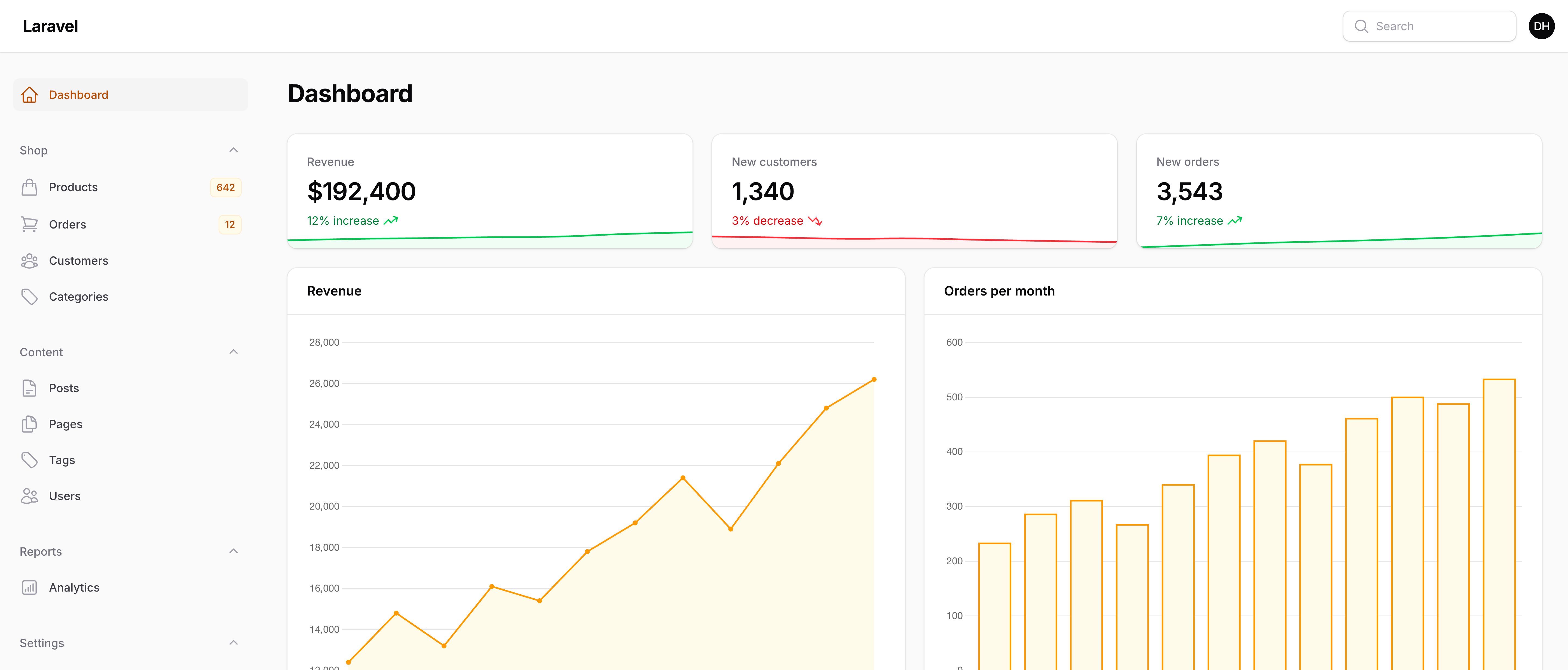
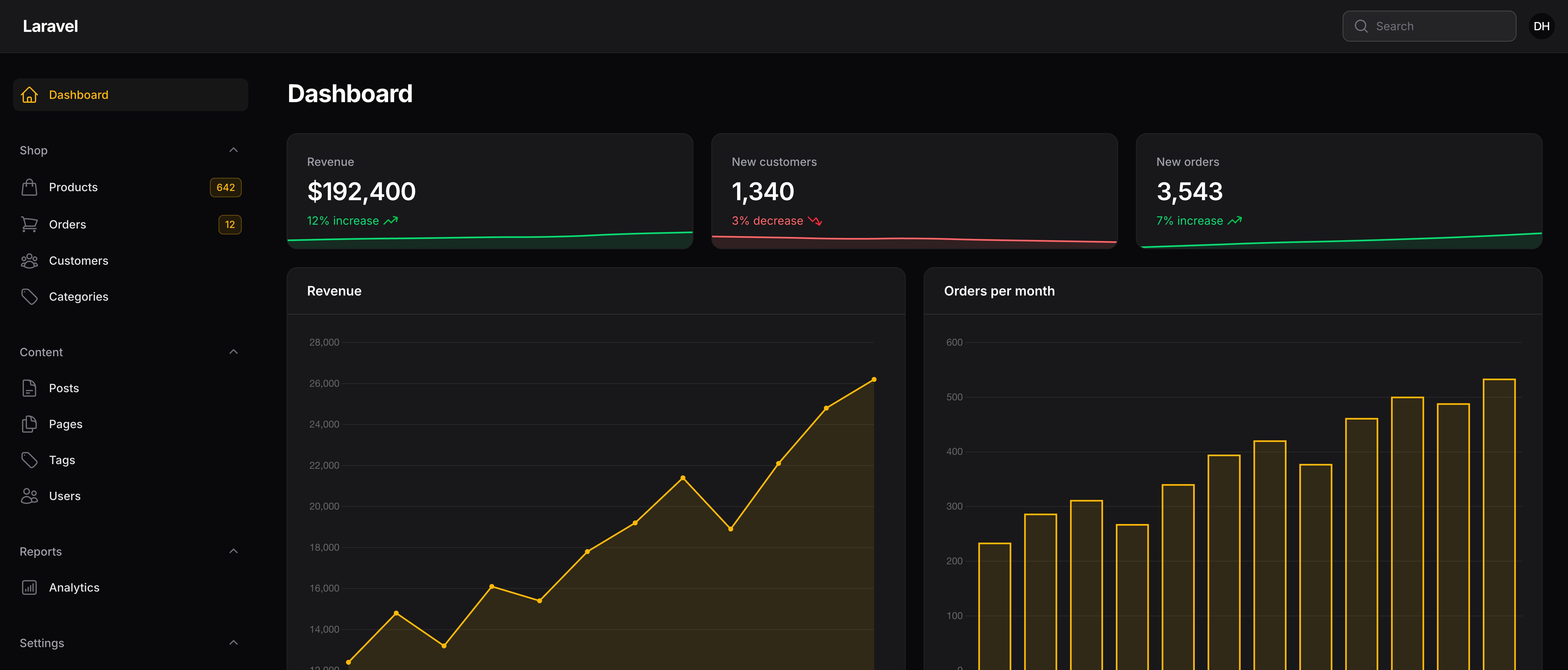
默认情况下,Filament 将会限制页面内容的宽度,这样它在大屏幕中不至于变得太宽。要对此进行修改,请使用 maxContentWidth() 方法。选项对应于 Tailwind 的最大宽度。选项包括 ExtraSmall、Small、Medium、Large、ExtraLarge、TwoExtraLarge、ThreeExtraLarge、FourExtraLarge、FiveExtraLarge、SixExtraLarge、SevenExtraLarge、Full、MinContent、MaxContent、FitContent、 Prose、ScreenSmall、ScreenMedium、ScreenLarge、ScreenExtraLarge 和 ScreenTwoExtraLarge。默认值为 SevenExtraLarge。
use Filament\Panel;
use Filament\Support\Enums\Width;

public function panel(Panel $panel): Panel
{
    return $panel
        // ...
        ->maxContentWidth(Width::Full);
}
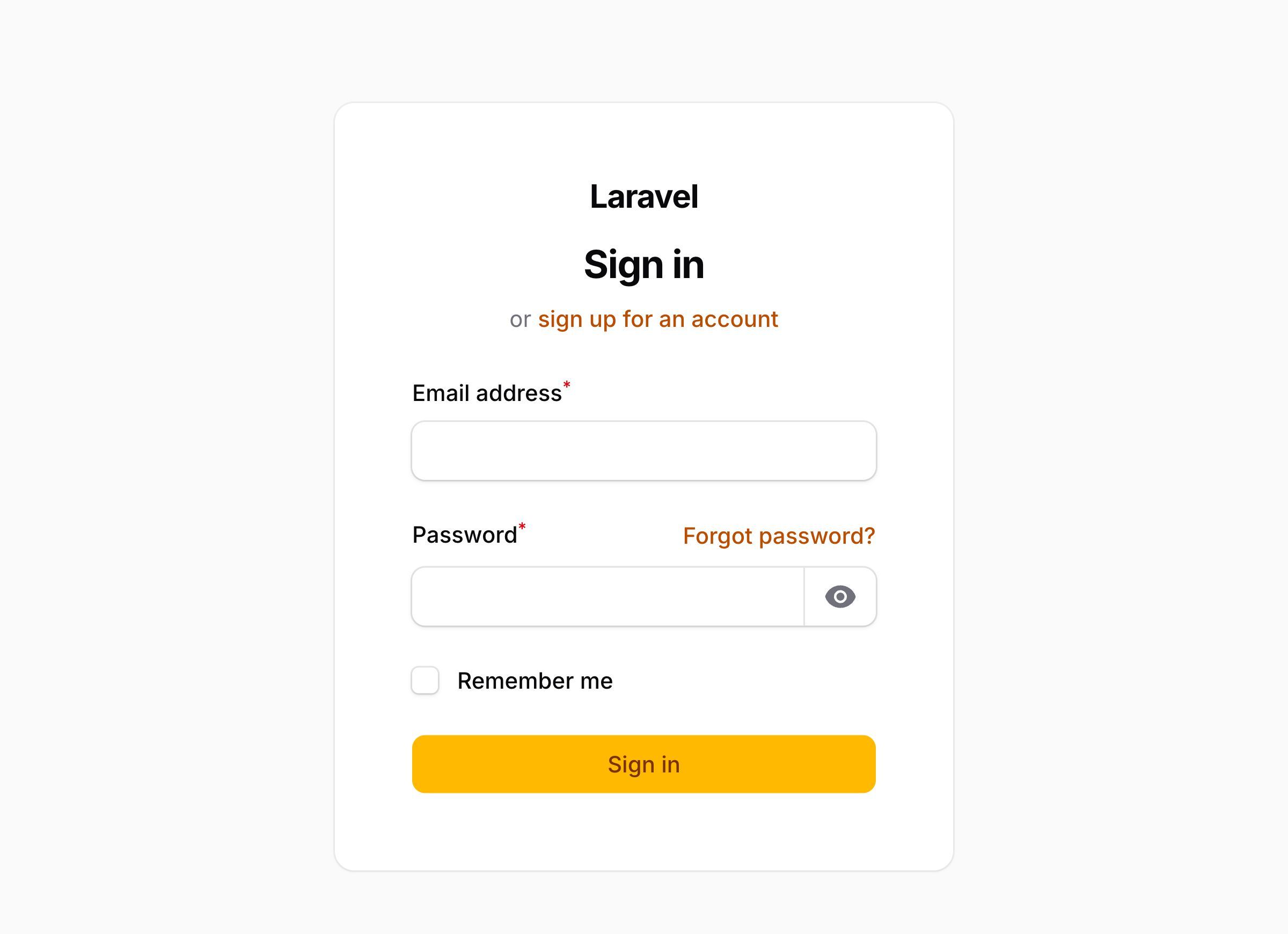
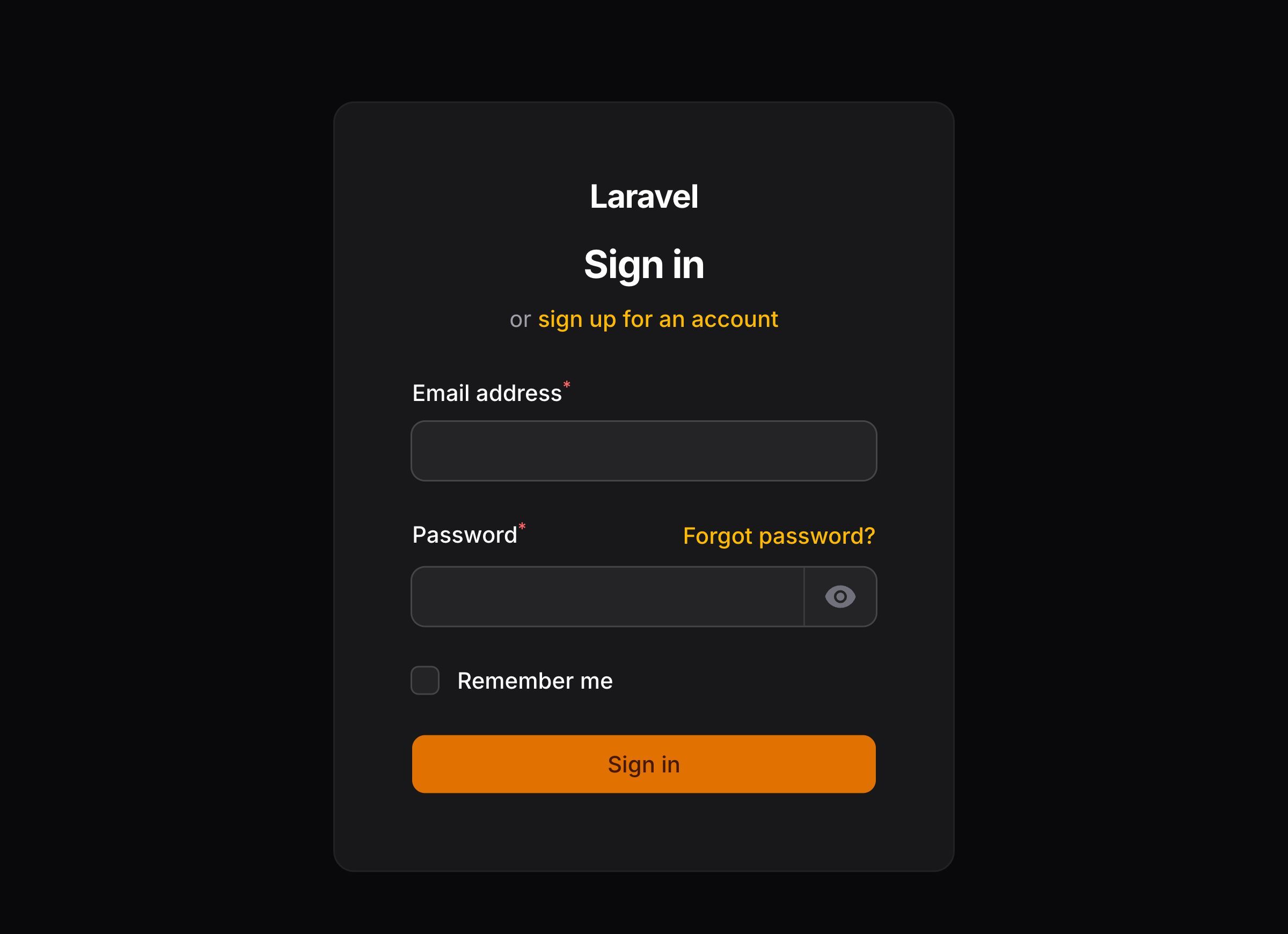
如果你想要设置 simplePage 类型(比如,登录页和注册页)的最大宽度,你可以使用 simplePageMaxContentWidth(),其默认值为 Large:
use Filament\Panel;
use Filament\Support\Enums\Width;

public function panel(Panel $panel): Panel
{
    return $panel
        // ...
        ->simplePageMaxContentWidth(Width::Small);
}
设置子导航默认位置
默认情况下,子导航在每个页面的起始位置渲染。不过,你可以根据页面、根据资源、根据 Cluster 的不同进行自定义,同时也可以使用 subNavigationPosition() 方法一次性为整个面板自定义子导航位置。它的值可以是 SubNavigationPosition::Start、SubNavigationPosition::End 或者 SubNavigationPosition::Top,将子导航渲染成选项卡:
use Filament\Pages\Enums\SubNavigationPosition;
use Filament\Panel;

public function panel(Panel $panel): Panel
{
    return $panel
        // ...
        ->subNavigationPosition(SubNavigationPosition::End);
}
生命周期钩子
钩子可以用在面板生命周期内执行代码,bootUsing() 是一个钩子,在该面板内发生的每个请求上运行。如果你有多个面板,只有当前面板的 bootUsing() 会运行。该函数在中间件中运行,在所有服务提供者启动之后运行:
use Filament\Panel;

public function panel(Panel $panel): Panel
{
    return $panel
        // ...
        ->bootUsing(function (Panel $panel) {
            // ...
        });
}
SPA 模式
SPA 模式利用了 Livewire 的 wire:navigate 特性,使得服务器渲染像单页应用一样,减少页面加载之间的延迟。要在面板中启用 SPA 模式,你可以使用 spa() 方法:
use Filament\Panel;

public function panel(Panel $panel): Panel
{
    return $panel
        // ...
        ->spa();
}
为特定 URL 禁用 SPA 导航
默认情况下,启用 SPA 模式启用,任何基于同一域名的其他 URL 请求将会使用 Livewire 的 wire:navigate 特性导航。如果你希望禁用某个特定 URL 的 SPA 模式,你可以使用 spaUrlExceptions() 方法:
use App\Filament\Resources\Posts\PostResource;
use Filament\Panel;

public function panel(Panel $panel): Panel
{
    return $panel
        // ...
        ->spa()
        ->spaUrlExceptions(fn (): array => [
            url('/admin'),
            PostResource::getUrl(),
        ]);
}
NOTE
本例中,我们使用资源上的 getUrl()来获取资源的首页 URL。该特性要求面板已经注册,而配置在请求生命周期的早期还不能做到这一点。你可以使用函数返回 URL,此 URL 将在面板注册后解析。
该 URL 需要精确匹配用户导航到的网址,包括域名和协议。如果你想要使用模板来匹配多个 URL,你可以使用星号(*)作为通配符:
use Filament\Panel;

public function panel(Panel $panel): Panel
{
    return $panel
        // ...
        ->spa()
        ->spaUrlExceptions([
            '*/admin/posts/*',
        ]);
}
启用 SPA 预读取
SPA 预读取在用户悬停到链接上时,自动预读取页面来提升用户体验,使得导航更具有响应式。该特性使用了 Livewire 的 wire:navigate.hover 功能。
要使用启用 SPA 预读取功能,你可用传入 hasPrefetching: true 参数到 spa() 方法中:
use Filament\Panel;

public function panel(Panel $panel): Panel
{
    return $panel
        // ...
        ->spa(hasPrefetching: true);
}
启用预读取后,面板内的所有链接都将自动包含 wire:navigate.hover,当用户悬停到链接上时,会预读取页面内容。这与 URL 异常无缝衔接 —— SPA 模式排除的任何链接也在预读取中排除掉。
NOTE
预读取只在 SPA 模式启用的情况下有效。如果你禁用了 SPA 模式,预读取也会自动禁用。
NOTE
预读取大页面可能会导致带宽和服务器负载的加重,尤其是在用户快速连续悬停在多个链接上时。请谨慎使用此功能,特别是当应用包含大量数据或复杂查询的页面时。
修改未保存警报
如果用户尝试切换到其他页面而未保存修改过的内容,你可以提醒用户。此功能适用于资源的新建和编辑页面,以及任何打开的 Action 模态框。要启用此功能,你可以使用 unsavedChangesAlerts() 方法:
use Filament\Panel;

public function panel(Panel $panel): Panel
{
    return $panel
        // ...
        ->unsavedChangesAlerts();
}
带有禁用 Schema 的 Action 模态框,比如只读 ViewAction 模态框,不会触发警报。你也可以使用 unsavedChangesAlert(false) 方法禁用针对其他无法包含未保存更改的操作的警告。
启用数据库事务
默认情况下,Filament 不会将操作包装到数据库事务中,但允许用户自己启用,用户需要自己测试以保证它们包装在事务中的操作是安全的。你也可以使用 databaseTransactions() 方法一次性启用所有操作的数据库事务:
use Filament\Panel;

public function panel(Panel $panel): Panel
{
    return $panel
        // ...
        ->databaseTransactions();
}
对于任何你不行要在包装如事务的操作(Action),你可以使用 databaseTransaction(false) 方法:
CreateAction::make()
    ->databaseTransaction(false)
对于任何类似于创建资源和编辑资源的页面,你可以在页面类中将 $hasDatabaseTransactions 属性设置为 false:
use Filament\Resources\Pages\CreateRecord;

class CreatePost extends CreateRecord
{
    protected ?bool $hasDatabaseTransactions = false;

    // ...
}
让特定 Action 和页面 Opt in 数据库事务
你可以选择为特定操作和页面启用数据库事务,而不是全局启用数据库事务再跟进需要取消选择。
对于 Action,你可以使用 databaseTransaction() 方法:
CreateAction::make()
    ->databaseTransaction()
对于任何类似于创建资源和编辑资源的页面,你可以在页面类中将 $hasDatabaseTransactions 属性设置为 true:
use Filament\Resources\Pages\CreateRecord;

class CreatePost extends CreateRecord
{
    protected ?bool $hasDatabaseTransactions = true;

    // ...
}
为面板注册资源
你可以注册只在特定面板的页面中加载的静态资源,而无需在其他面板加载。为此,可以将资源数组传递到 assets() 方法:
use Filament\Panel;
use Filament\Support\Assets\Css;
use Filament\Support\Assets\Js;

public function panel(Panel $panel): Panel
{
    return $panel
        // ...
        ->assets([
            Css::make('custom-stylesheet', resource_path('css/custom.css')),
            Js::make('custom-script', resource_path('js/custom.js')),
        ]);
}
在使用这些资源之前,你需要先运行 php artisan filament:assets。
使用中间件
通过将中间件类数组传入到配置文件的 middleware() 方法中,你可以将额外的中间件应用到所有的路由中:
use Filament\Panel;

public function panel(Panel $panel): Panel
{
    return $panel
        // ...
        ->middleware([
            // ...
        ]);
}
默认情况下,中间件会在页面首次加载时运行,而不会在后续的 Livewire AJAX 请求时执行。如果你希望每次请求时都运行中间件,你可以将 middleware() 方法的第二个参数以 true 传入:
use Filament\Panel;

public function panel(Panel $panel): Panel
{
    return $panel
        // ...
        ->middleware([
            // ...
        ], isPersistent: true);
}
将 middleware 应用到所有认证路由
通过将中间件类数组传入到配置文件的 authMiddleware() 方法中,你可以将中间件应用到所有认证过的路由中:
use Filament\Panel;

public function panel(Panel $panel): Panel
{
    return $panel
        // ...
        ->authMiddleware([
            // ...
        ]);
}
默认情况下,中间件会在页面首次加载时运行,而不会在后续的 Livewire AJAX 请求时执行。如果你希望每次请求时都运行中间件,你可以将布尔值 true 作为 authMiddleware() 方法的第二个参数传入:
use Filament\Panel;

public function panel(Panel $panel): Panel
{
    return $panel
        // ...
        ->authMiddleware([
            // ...
        ], isPersistent: true);
}
禁用广播
默认情况下,如果发布的 config/filament.php 配置文件中设置了 Laravel Echo 的凭证,Laravel Echo 将为所有面板自动建立连接。要在面板中禁用自动连接,你可以使用 broadcasting(false) 方法。
use Filament\Panel;

public function panel(Panel $panel): Panel
{
    return $panel
        // ...
        ->broadcasting(false);
}
严格授权模式
默认情况下,当 Filament 授权用户访问资源时,它首先会检查该模型是否有对应的策略,如果有,则检查是否该策略中存在对应的方法来执行操作。如果策略或者策略方法不存在,它将授权用户访问资源,因为他会假定用户尚未设置授权策略,或者你不需要授权策略。
如果你倾向于在策略或者策略方法不存在时,让 Filament 抛出异常,你可以使用 strictAuthorization() 方法,启用严格授权模式:
use Filament\Panel;

public function panel(Panel $panel): Panel
{
    return $panel
        // ...
        ->strictAuthorization();
}
配置出错通知
当 Laravel 的调试模式禁用时,Filament 将会用更简洁的 Flash 通知替代 Livewire 的全屏错误模态框。你可以使用 errorNotifications(false) 方法来禁用此行为:
use Filament\Panel;

public function panel(Panel $panel): Panel
{
    return $panel
        // ...
        ->errorNotifications(false);
}
通过将字符串传递给 registerErrorNotification() 方法的 title 和 body 参数,你可以自定义报错通知:
use Filament\Panel;

public function panel(Panel $panel): Panel
{
    return $panel
        // ...
        ->registerErrorNotification(
            title: 'An error occurred',
            body: 'Please try again later.',
        );
}
通过将 HTTP 状态码传递给 statusCode 参数,你也可以为特定的状态码(如 404)注册出错通知文本。
use Filament\Panel;

public function panel(Panel $panel): Panel
{
    return $panel
        // ...
        ->registerErrorNotification(
            title: 'An error occurred',
            body: 'Please try again later.',
        )
        ->registerErrorNotification(
            title: 'Record not found',
            body: 'A record you are looking for does not exist.',
            statusCode: 404,
        );
}
你也可以将状态码传给 hiddenErrorNotification() 方法,选择隐藏特定 HTTP 状态码(比如 403)的通知。隐藏的状态码仍然可以被 Filament 捕获,但不会显示通知。
或者,你也可以使用 disabledErrorNotification() 方法,回退到 Livewire 针对该状态码的内置错误处理。如果你想接入 Livewire 的错误处理系统,为特定状态码自定义错误处理行为,同时为其他所有情况保持 Filament 的错误通知系统,这将非常有用。
use Filament\Panel;

public function panel(Panel $panel): Panel
{
    return $panel
        // ...
        ->registerErrorNotification(
            title: 'An error occurred',
            body: 'Please try again later.',
        )
        ->hiddenErrorNotification(403)
        ->disabledErrorNotification(503);
}
通过设置页面类的 $hasErrorNotifications 属性,你可以为特定页面启用或禁用出错通知:
use Filament\Pages\Dashboard as BaseDashboard;

class Dashboard extends BaseDashboard
{
    protected ?bool $hasErrorNotifications = true;

    // or

    protected ?bool $hasErrorNotifications = false;

    // ...
}
如果你想要运行自定义代码来确认出错通知是否该被显示,可以在页面类中编写 hasErrorNotifications() 方法:
use Filament\Pages\Dashboard as BaseDashboard;

class Dashboard extends BaseDashboard
{
    public function hasErrorNotifications(): bool
    {
        return FeatureFlag::active();
    }

    // ...
}
你也可以在页面类中的 setUpErrorNotifications() 方法内调用 registerErrorNotification() 方法注册出错通知文本:
use Filament\Pages\Dashboard as BaseDashboard;

class Dashboard extends BaseDashboard
{
    protected function setUpErrorNotifications(): void
    {
        $this->registerErrorNotification(
            title: 'An error occurred',
            body: 'Please try again later.',
        );
    }

    // ...
}
通过将 HTTP 状态码传递给 statusCode 参数,你也可以为特定的状态码(如 404)注册出错通知文本。
use Filament\Pages\Dashboard as BaseDashboard;

class Dashboard extends BaseDashboard
{
    protected function setUpErrorNotifications(): void
    {
        $this->registerErrorNotification(
            title: 'An error occurred',
            body: 'Please try again later.',
        );

        $this->registerErrorNotification(
            title: 'Record not found',
            body: 'A record you are looking for does not exist.',
            statusCode: 404,
        );
    }

    // ...
}
你也可以选择通过将特定 HTTP 状态码(如 403)传递给 hiddenErrorNotification() 方法来隐藏该状态码的通知。隐藏的状态码仍会被filament捕获,但不会显示任何通知。
或者,你也可以使用 disabledErrorNotification() 方法,回退到 Livewire 针对该状态码的内置错误处理。如果你想接入 Livewire 的错误处理系统来为特定状态码自定义错误处理行为,但在其他情况下保持 Filament 的错误通知系统,这将非常有用。
use Filament\Pages\Dashboard as BaseDashboard;

class Dashboard extends BaseDashboard
{
    protected function setUpErrorNotifications(): void
    {
        $this->registerErrorNotification(
            title: 'An error occurred',
            body: 'Please try again later.',
        );

        $this->hiddenErrorNotification(403);

        $this->disabledErrorNotification(503);
    }

    // ...
}
Still need help? Join our Discord community or open a GitHub discussion