
Action
导出操作
简介
Filament 包含一个可以将行数据导出到 CSV 或者 XLSX 文件的 Action。点击触发按钮后,会打开一个模态框询问用户要导出那些列,以及这些类要使用什么标签。该特性使用了队列批量操作及数据库通知,因此你需要发布这些迁移到 Laravel 中。同时,也需要发布 Filament 用于存储导出数据的迁移表:
php artisan make:queue-batches-table
php artisan make:notifications-table
php artisan vendor:publish --tag=filament-actions-migrations
php artisan migrate
如果你想要在面板中接收导出通知,你可以在面板配置中启用。
NOTE
如果你使用的是 PostgreSQL,请确保通知迁移中的 data 字段使用 json(): $table->json('data')。
NOTE
如果 User 模型使用了 UUID,请确保通知迁移的 notifiable 字段使用 uuidMorphs(): $table->uuidMorphs('notifiable')
ExportAction 可以这样使用:
use App\Filament\Exports\ProductExporter;
use Filament\Actions\ExportAction;

ExportAction::make()
    ->exporter(ProductExporter::class)
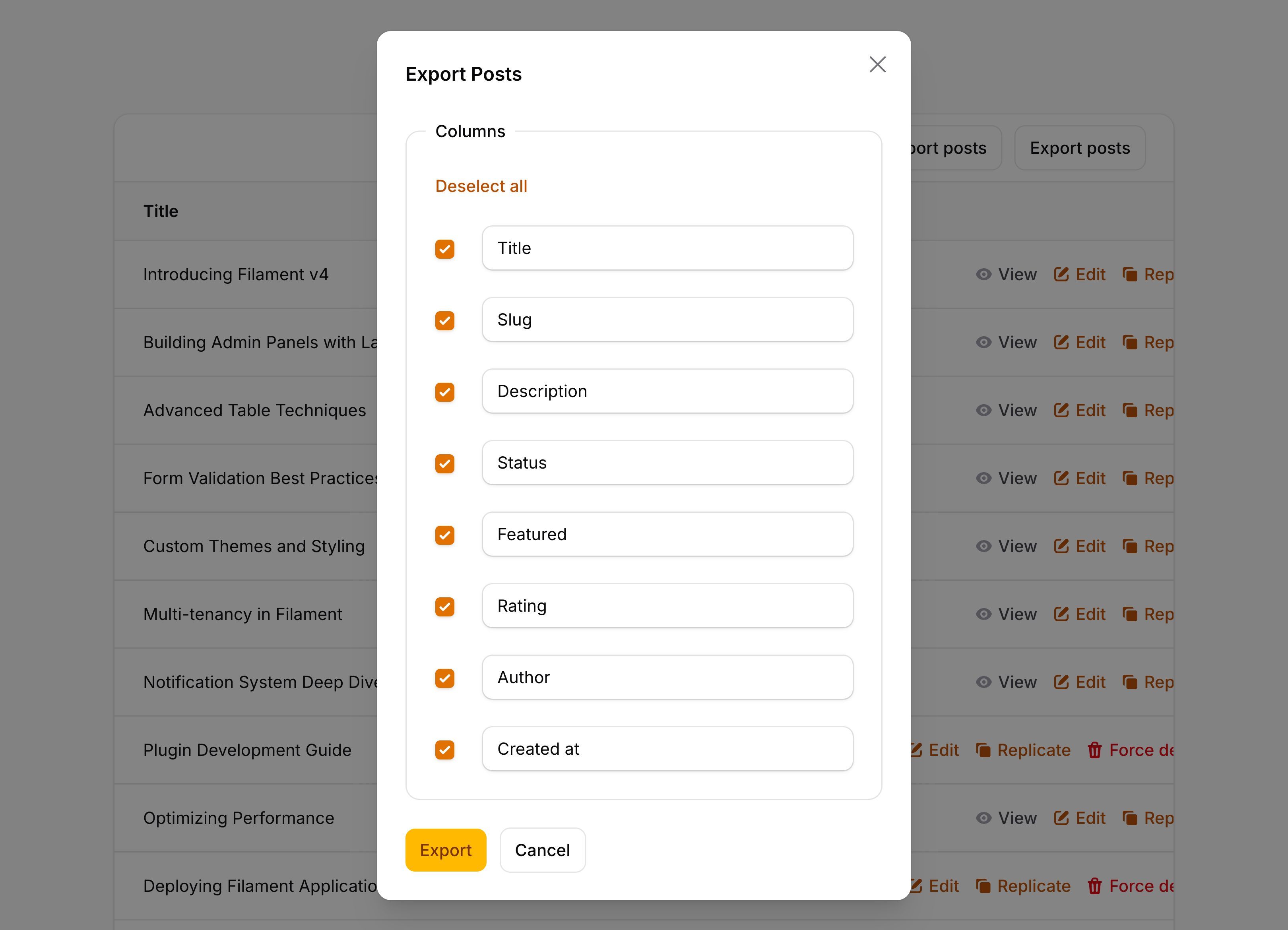
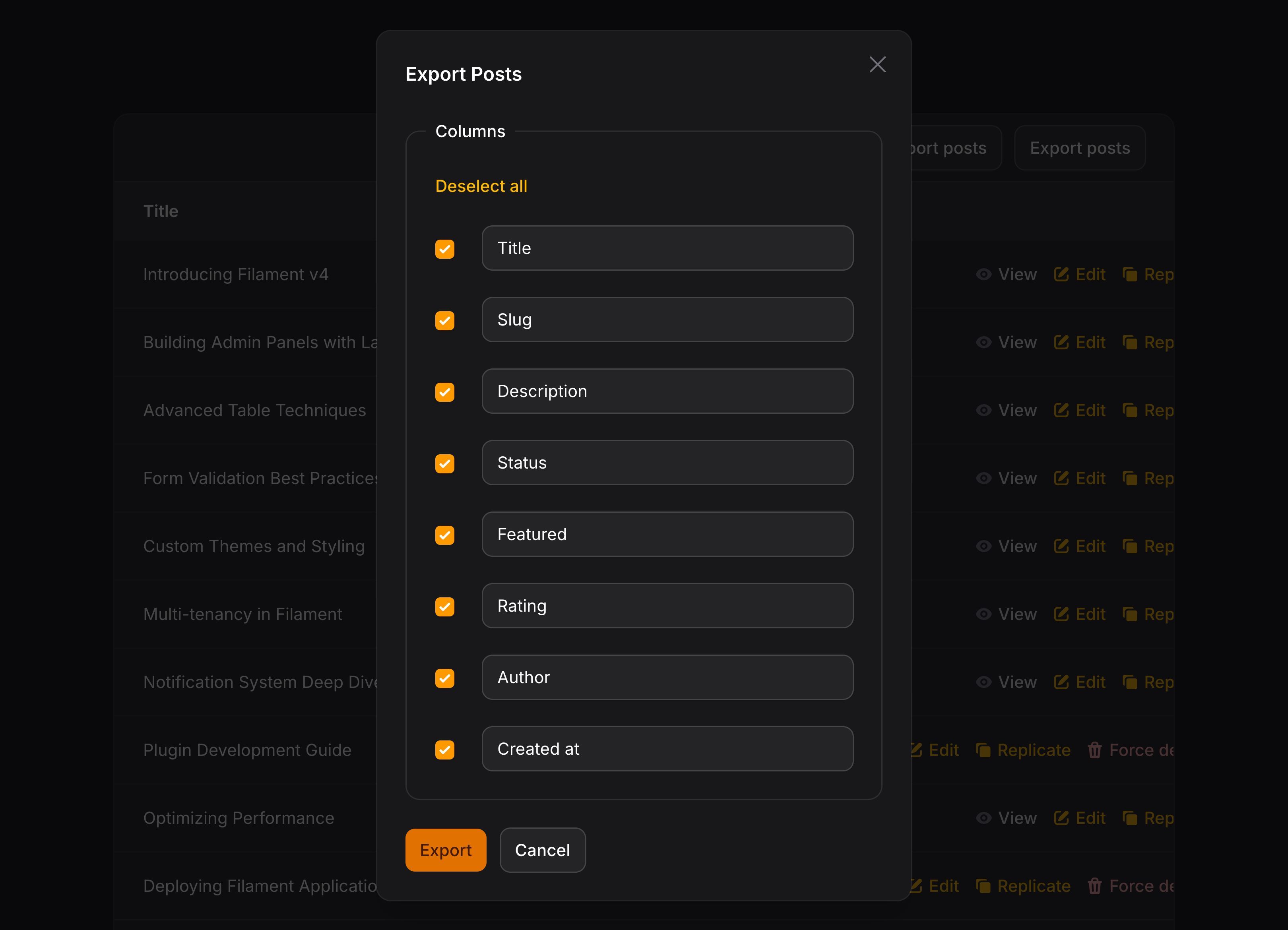
如果你想将该 Action 添加到表头,可以这样使用:
use App\Filament\Exports\ProductExporter;
use Filament\Actions\ExportAction;
use Filament\Tables\Table;

public function table(Table $table): Table
{
    return $table
        ->headerActions([
            ExportAction::make()
                ->exporter(ProductExporter::class),
        ]);
}
或者,如果你想将其添加为表格的批量操作,让用户可以选择导出哪些行,可以使用 Filament\Actions\ExportBulkAction:
use App\Filament\Exports\ProductExporter;
use Filament\Actions\ExportBulkAction;
use Filament\Tables\Table;

public function table(Table $table): Table
{
    return $table
        ->toolbarActions([
            ExportBulkAction::make()
                ->exporter(ProductExporter::class),
        ]);
}
此处需要创建 “exporter” 类,以告知 Filament 如何导出每一行。
创建导出器
要为模型创建 exporter 类,可以使用 make:filament-exporter 命令,并传入模型名称:
php artisan make:filament-exporter Product
该命令将在 app/Filament/Exports 目录下创建一个新类。你需要定义可被导出的列字段。
自动生成导出列
如果你想节省时间,可以使用 --generate,Filament 将基于模型的数据库字段,为你自动生成列字段:
php artisan make:filament-exporter Product --generate
定义导出字段
要定义可被导出的列,你需要在导出器类中重写 getColumns() 方法,并使其返回 ExportColumn 对象数组:
use Filament\Actions\Exports\ExportColumn;

public static function getColumns(): array
{
    return [
        ExportColumn::make('name'),
        ExportColumn::make('sku')
            ->label('SKU'),
        ExportColumn::make('price'),
    ];
}
自定义导出列标签
每个列的标签将由该列名称自动生成,不过你也可以调用 label() 方法对其进行重写:
use Filament\Actions\Exports\ExportColumn;

ExportColumn::make('sku')
    ->label('SKU')
配置默认选择的列
默认情况下,当用户被询问要导出哪些列时,所有的列都会被选中。你可以使用 enabledByDefault() 方法自定义默认选择的列:
use Filament\Actions\Exports\ExportColumn;

ExportColumn::make('description')
    ->enabledByDefault(false)
你可以使用 ExportAction 上的 enableVisibleTableColumnsByDefault() 方法,从而默认仅启用表格中当前可见的列。使用了 enabledByDefault(false) 的列也将默认处于禁用状态:
use App\Filament\Exports\ProductExporter;
use Filament\Actions\ExportAction;

ExportAction::make()
    ->exporter(ProductExporter::class)
    ->enableVisibleTableColumnsByDefault()
隐藏导出列
你可以使用 hidden() 或 visible() 方法完全隐藏某一列。被隐藏的列既不会显示在列选择表单中,也不会被写入导出的文件:
use Filament\Actions\Exports\ExportColumn;

ExportColumn::make('sku')
    ->hidden()

ExportColumn::make('sku')
    ->visible()
要根据条件隐藏列,你可以向任一方法传入一个布尔值:
use Filament\Actions\Exports\ExportColumn;

ExportColumn::make('cost_price')
    ->hidden(fn (): bool => ! auth()->user()->isAdmin())

ExportColumn::make('cost_price')
    ->visible(fn (): bool => auth()->user()->isAdmin())
NOTE
与表格列不同,导出列的解析过程不涉及具体记录,因此 hidden() 或 visible() 闭包无法依赖行数据。请将其用于架构层面的条件判断,例如已认证用户、功能开关或配置项。
若希望保留列的可选状态,但默认不勾选(而非将其完全隐藏),请使用 enabledByDefault(false)。
配置列选择表单的布局
默认情况下,列选择表单采用单列布局。你可以使用 columnMappingColumns() 方法并传入希望在大屏幕上使用的列数,更改此设置:
use App\Filament\Exports\ProductExporter;
use Filament\Actions\ExportAction;

ExportAction::make()
    ->exporter(ProductExporter::class)
    ->columnMappingColumns(3)
这将以三列布局显示列选择复选框和标签输入框,从而在存在大量可导出列时更有效地利用可用空间。请注意,尽管在大屏幕上会渲染三列布局,但该布局仍具备响应式特性,在较小屏幕上显示的列数会相应减少。
禁用列选择
默认情况下,会询问用户要导出哪些列。你可以使用 columnMapping(false) 方法禁用该功能。
use App\Filament\Exports\ProductExporter;
use Filament\Actions\ExportAction;

ExportAction::make()
    ->exporter(ProductExporter::class)
    ->columnMapping(false)
计算导出列状态
有时,你需要计算列状态,而不是直接从数据库字段中读取。
传入一个回调函数到 state() 方法,你可以自定义该列基于 $record 的返回值。
use App\Models\Order;
use Filament\Actions\Exports\ExportColumn;

ExportColumn::make('amount_including_vat')
    ->state(function (Order $record): float {
        return $record->amount * (1 + $record->vat_rate);
    })
除了 $record 之外,state() 函数可以注入各种 utility 作为参数。
| Utility | 类型 | 参数 | 描述 |
|---|---|---|---|
| Export column | Filament\Actions\Exports\ExportColumn | $column | The current export column instance. |
| Exporter | ?Filament\Actions\Exports\Exporter | $exporter | The instance of the exporter class that is currently being used for exporting data. |
| Options | array<string, mixed> | $options | The options that were defined when the export started. |
| Eloquent record | ?Illuminate\Database\Eloquent\Model | $record | The Eloquent record that is currently being exported. |
格式化导出列的值
你也可以传入一个自定义格式化回调函数给 formatStateUsing(),它接受单元格的 $state 和 Eloquent 记录 $record(可选):
use Filament\Actions\Exports\ExportColumn;

ExportColumn::make('status')
    ->formatStateUsing(fn (string $state): string => __("statuses.{$state}"))
除了 $state 之外,formatStateUsing() 函数可以注入各种 utility 作为参数。
| Utility | 类型 | 参数 | 描述 |
|---|---|---|---|
| Export column | Filament\Actions\Exports\ExportColumn | $column | The current export column instance. |
| Exporter | ?Filament\Actions\Exports\Exporter | $exporter | The instance of the exporter class that is currently being used for exporting data. |
| Options | array<string, mixed> | $options | The options that were defined when the export started. |
| Eloquent record | ?Illuminate\Database\Eloquent\Model | $record | The Eloquent record that is currently being exported. |
| State | mixed | $state | The state to format. |
如果列中有多个值,每个值都会调用该函数。
限制文本长度
使用 limit() 方法,你可以限制单元格中的值的长度:
use Filament\Actions\Exports\ExportColumn;

ExportColumn::make('description')
    ->limit(50)
除了允许静态值之外,limit() 方法也可以接受函数动态计算其值。你可以将各种 utility 作为参数注入到函数中。
| Utility | 类型 | 参数 | 描述 |
|---|---|---|---|
| Export column | Filament\Actions\Exports\ExportColumn | $column | The current export column instance. |
| Exporter | ?Filament\Actions\Exports\Exporter | $exporter | The instance of the exporter class that is currently being used for exporting data. |
| Options | array<string, mixed> | $options | The options that were defined when the export started. |
| Eloquent record | ?Illuminate\Database\Eloquent\Model | $record | The Eloquent record that is currently being exported. |
限制字数
使用 words() 方法,你可以限制单元格中显示的字数:
use Filament\Actions\Exports\ExportColumn;

ExportColumn::make('description')
    ->words(10)
除了允许静态值之外,words() 方法也可以接受函数动态计算其值。你可以将各种 utility 作为参数注入到函数中。
| Utility | 类型 | 参数 | 描述 |
|---|---|---|---|
| Export column | Filament\Actions\Exports\ExportColumn | $column | The current export column instance. |
| Exporter | ?Filament\Actions\Exports\Exporter | $exporter | The instance of the exporter class that is currently being used for exporting data. |
| Options | array<string, mixed> | $options | The options that were defined when the export started. |
| Eloquent record | ?Illuminate\Database\Eloquent\Model | $record | The Eloquent record that is currently being exported. |
添加前后缀
使用 prefix() 或者 suffix(),你可以添加前缀或者后缀到单元格值中:
use Filament\Actions\Exports\ExportColumn;

ExportColumn::make('domain')
    ->prefix('https://')
    ->suffix('.com')
除了允许静态值之外,prefix() 和 suffix() 方法也可以接受函数动态计算它们值。你可以将各种 utility 作为参数注入到函数中。
| Utility | 类型 | 参数 | 描述 |
|---|---|---|---|
| Export column | Filament\Actions\Exports\ExportColumn | $column | The current export column instance. |
| Exporter | ?Filament\Actions\Exports\Exporter | $exporter | The instance of the exporter class that is currently being used for exporting data. |
| Options | array<string, mixed> | $options | The options that were defined when the export started. |
| Eloquent record | ?Illuminate\Database\Eloquent\Model | $record | The Eloquent record that is currently being exported. |
在单元格中导出多个值
默认情况下,如果列中有多个值,将会使用逗号进行分隔。你可以使用 listAsJson() 方法将它们显示成 JSON 数组:
use Filament\Actions\Exports\ExportColumn;

ExportColumn::make('tags')
    ->listAsJson()
展示关联数据
你可以使用“点语法”访问关联中的列。首先是关联名,其后紧跟着点号,最后是要展示的列名:
use Filament\Actions\Exports\ExportColumn;

ExportColumn::make('author.name')
计数关联
如果你想计算列中的关联记录数量,可以使用 counts() 方法:
use Filament\Actions\Exports\ExportColumn;

ExportColumn::make('users_count')
    ->counts('users')
本例中,users 是要计算的关联名。列名必须为 users_count,因为这是 Laravel 用来存储计数结果 的命名规范。
如果你想在计算前设置关联的查询范围,你可以传入一个数组到该方法中,其中键是关联名,值为设置 Eloquent 查询范围的函数:
use Filament\Actions\Exports\ExportColumn;
use Illuminate\Database\Eloquent\Builder;

ExportColumn::make('users_count')
    ->counts([
        'users' => fn (Builder $query) => $query->where('is_active', true),
    ])
确定关联是否存在
如果你只是想说明列中是否存在关联记录,你可以使用 exists() 方法:
use Filament\Actions\Exports\ExportColumn;

ExportColumn::make('users_exists')
    ->exists('users')
本例中,users 是要检查是否存在的关联名。列名必须是 users_exists,因为这是 Laravel 用来存储计数结果 的命名规范。
如果你想在计算前设置关联的查询范围,你可以传入一个数组到该方法中,其中键是关联名,值为设置 Eloquent 查询范围的函数:
use Filament\Actions\Exports\ExportColumn;
use Illuminate\Database\Eloquent\Builder;

ExportColumn::make('users_exists')
    ->exists([
        'users' => fn (Builder $query) => $query->where('is_active', true),
    ])
聚合关联
Filament 提供多种方法用于聚合关联字段,包括 avg()、max()、min() 和 sum()。比如,如果你想显示列中所有关联的平均值,你可以使用 avg() 方法:
use Filament\Actions\Exports\ExportColumn;

ExportColumn::make('users_avg_age')
    ->avg('users', 'age')
上例中,users 是关联名,而 age 是要计算平均值的字段。列名必须是 users_avg_age,因为这是 Laravel 用来存储聚合结果 的命名规范。
如果你想在计算前设置关联的查询范围,你可以传入一个数组到该方法中,其中键是关联名,值为设置 Eloquent 查询范围的函数:
use Filament\Actions\Exports\ExportColumn;
use Illuminate\Database\Eloquent\Builder;

ExportColumn::make('users_avg_age')
    ->avg([
        'users' => fn (Builder $query) => $query->where('is_active', true),
    ], 'age')
配置导出格式
默认情况下,导出 Action 会允许用户在 CSV 和 XLSX 格式之间做出选择。你可以在 Action 的 formats() 方法中传入一个格式数组,使用 ExportFormat 枚举对此进行自定义:
use App\Filament\Exports\ProductExporter;
use Filament\Actions\ExportAction;
use Filament\Actions\Exports\Enums\ExportFormat;

ExportAction::make()
    ->exporter(ProductExporter::class)
    ->formats([
        ExportFormat::Csv,
    ])
    // or
    ->formats([
        ExportFormat::Xlsx,
    ])
    // or
    ->formats([
        ExportFormat::Xlsx,
        ExportFormat::Csv,
    ])
此外,你可以在导出器类中重写 getFormats() 方法,为所有使用该导出器的 Action 设置默认格式:
use Filament\Actions\Exports\Enums\ExportFormat;

public function getFormats(): array
{
    return [
        ExportFormat::Csv,
    ];
}
自定义导出文件的下载方式
默认情况下,每种导出格式都使用其专属的下载器来返回流式响应。你可以通过重写 getDownloader() 方法,为导出器自定义下载器:
use App\Filament\Exports\Downloaders\CustomCsvDownloader;
use App\Filament\Exports\Downloaders\CustomXlsxDownloader;
use Filament\Actions\Exports\Downloaders\Contracts\Downloader;
use Filament\Actions\Exports\Enums\Contracts\ExportFormat as ExportFormatInterface;
use Filament\Actions\Exports\Enums\ExportFormat;

public static function getDownloader(ExportFormatInterface $format): Downloader
{
    return match ($format) {
        ExportFormat::Csv => app(CustomCsvDownloader::class),
        ExportFormat::Xlsx => app(CustomXlsxDownloader::class),
        default => $format->getDownloader(),
    };
}
下载器是一个可调用的类,它接受 Export 模型并返回 Symfony Response。此响应可以流式传输下载、返回文件或将用户重定向到远程文件系统上的临时 URL。
Filament 的内置下载路径仅解析 ExportFormat::Csv 和 ExportFormat::Xlsx 格式。如果你使用自定义 ExportFormatInterface 实现,其 getDownloadNotificationAction() 方法必须链接到处理自定义格式的路由。
如果你的自定义下载器仅更改生成的内容的交付方式,你可以使用 CsvExportContentGenerator 迭代生成的 CSV 块,或使用XlsxExportContentGenerator 将生成的行写入 OpenSpout Writer。 Filament 从容器中解析这两个类,以便你可以重用内置内容生成而无需重复它。必须在将 Writer 传递给 XlsxExportContentGenerator 之前打开 Writer,然后将其关闭。 XlsxExportContentGenerator 镜像 Filament 的按需 XLSX 下载,并且在队列 XLSX 文件生成时不应用所使用的编写器选项、样式、自定义行创建或编写器生命周期挂钩。
修改导出查询
默认情况下,如果在表格中使用 ExportAction,该操作竟会使用表格当前的过滤和排序查询来导出数据。如果你没有表格,它将使用模型的默认查询。要在导出前修改查询构造器,你可以在该操作上使用 modifyQueryUsing() 方法:
use App\Filament\Exports\ProductExporter;
use Filament\Actions\ExportAction;
use Illuminate\Database\Eloquent\Builder;

ExportAction::make()
    ->exporter(ProductExporter::class)
    ->modifyQueryUsing(fn (Builder $query) => $query->where('is_active', true))
你也可以注入 $options 参数到该函数中,该参数是用以导出的选项数组:
use App\Filament\Exports\ProductExporter;
use Illuminate\Database\Eloquent\Builder;

ExportAction::make()
    ->exporter(ProductExporter::class)
    ->modifyQueryUsing(fn (Builder $query, array $options) => $query->where('is_active', $options['isActive'] ?? true))
此外,你可以在导出器类中重写 modifyQuery() 方法,它将修改使用该导出器的所有 Action 的查询:
use Illuminate\Database\Eloquent\Builder;
use Illuminate\Database\Eloquent\Relations\MorphTo;

public static function modifyQuery(Builder $query): Builder
{
    return $query->with([
        'purchasable' => fn (MorphTo $morphTo) => $morphTo->morphWith([
            ProductPurchase::class => ['product'],
            ServicePurchase::class => ['service'],
            Subscription::class => ['plan'],
        ]),
    ]);
}
配置导出文件系统
自定义存储磁盘
默认情况下,导出文件会上传到配置文件中定义的存储磁盘中(默认为 public)。你也可以设置 FILESYSTEM_DISK 环境变量来修改他它。
虽然使用 public 磁盘是 Filament 许多包的默认设置,但将其用于导出会导致导出的文件存储在公共位置。因此,如果默认的文件系统磁盘是public,并且你的 config/filesystems.php 中存在 local 磁盘,Filament 将使用 local 盘进行导出。如果你为 ExportAction 或导出器类将磁盘重写为 public,Filament 将使用它。
在生产环境中,你应该使用具有私有访问策略的磁盘,如 s3,以防止对导出文件的未经授权的访问。
如果你想为特定的导出使用不同的磁盘,你可以将磁盘名称传递给操作上的 disk() 方法:
use Filament\Actions\ExportAction;

ExportAction::make()
    ->exporter(ProductExporter::class)
    ->fileDisk('s3')
你可以在服务提供者(比如 AppServiceProvider)的 boot() 方法中一次性设置所有导出 Action 的磁盘:
use Filament\Actions\ExportAction;

ExportAction::configureUsing(fn (ExportAction $action) => $action->fileDisk('s3'));
此外,你也可以重写导出器类的 getFileDisk(),使之返回磁盘名:
public function getFileDisk(): string
{
    return 's3';
}
在有需要时删除创建的导出文件是开发者的责任,Filament 不会删除这些文件,以防以后需要再次下载导出。
配置导出文件名
默认情况下,导出文件的名称是基于 ID 和导出类型生成的。你可以使用 Action 上的 fileName() 方法,自定义文件名:
use Filament\Actions\ExportAction;
use Filament\Actions\Exports\Models\Export;

ExportAction::make()
    ->exporter(ProductExporter::class)
    ->fileName(fn (Export $export): string => "products-{$export->getKey()}")
此外,你也可以重写导出器类的 getFileName(),使之返回自定义字符串:
use Filament\Actions\Exports\Models\Export;

public function getFileName(Export $export): string
{
    return "products-{$export->getKey()}";
}
使用导出选项
导出操作可以渲染用户在导出 CSV 时可以与之交互的额外表单组件。这对于允许用户自定义导出器的行为非常有用。例如,你可能希望用户在导出时能够选择特定列的格式。为此,你可以在导出器类上的 getOptionsFormComponent() 方法返回选项表单组件:
use Filament\Forms\Components\TextInput;

public static function getOptionsFormComponents(): array
{
    return [
        TextInput::make('descriptionLimit')
            ->label('Limit the length of the description column content')
            ->integer(),
    ];
}
此外,你也可以通过 Action 的 option() 方法传递一组静态选项给导出器:
use App\Filament\Exports\ProductExporter;
use Filament\Actions\ExportAction;

ExportAction::make()
    ->exporter(ProductExporter::class)
    ->options([
        'descriptionLimit' => 250,
    ])
除了允许静态值之外,options() 方法也可以接受函数动态计算其值。你可以将各种 utility 作为参数注入到函数中。
了解更多 utility 注入详情。 | Utility | 类型 | 参数 | 描述 |
|---|---|---|---|
| Action | Filament\Actions\Action | $action | The current action instance. |
| Arguments | array<string, mixed> | $arguments | The array of arguments passed to the action when it was triggered. |
| Data | array<string, mixed> | $data | The array of data submitted from form fields in the action's modal. It will be empty before the modal form is submitted. |
| Livewire | Livewire\Component | $livewire | The Livewire component instance. |
| Eloquent model FQN | ?string<Illuminate\Database\Eloquent\Model> | $model | The Eloquent model FQN for the current action, if one is attached. |
| Mounted actions | array<Filament\Actions\Action> | $mountedActions | The array of actions that are currently mounted in the Livewire component. This is useful for accessing data from parent actions. |
| Eloquent record | ?Illuminate\Database\Eloquent\Model | $record | The Eloquent record for the current action, if one is attached. |
| Schema | Filament\Schemas\Schema | $schema | [Actions in schemas only] The schema object that this action belongs to. |
| Schema component | Filament\Schemas\Components\Component | $schemaComponent | [Actions in schemas only] The schema component that this action belongs to. |
| Schema component state | mixed | $schemaComponentState | [Actions in schemas only] The current value of the schema component. |
| Schema get function | Filament\Schemas\Components\Utilities\Get | $schemaGet | [Actions in schemas only] A function for retrieving values from the schema data. Validation is not run on form fields. |
| Schema operation | string | $schemaOperation | [Actions in schemas only] The current operation being performed by the schema. Usually create, edit, or view. |
| Schema set function | Filament\Schemas\Components\Utilities\Set | $schemaSet | [Actions in schemas only] A function for setting values in the schema data. |
| Selected Eloquent records | Illuminate\Support\Collection | $selectedRecords | [Bulk actions only] The Eloquent records selected in the table. |
| Table | Filament\Tables\Table | $table | [Actions in tables only] The table object that this action belongs to. |
现在,通过将 $options 参数注入到闭包函数中,你可以在导出类中访问这些选项的数据。比如,如果你想在 formatStateUsing() 中使用它们来格式化列值:
use Filament\Actions\Exports\ExportColumn;

ExportColumn::make('description')
    ->formatStateUsing(function (string $state, array $options): string {
        return (string) str($state)->limit($options['descriptionLimit'] ?? 100);
    })
此外,因为 $options 参数被传入到所有闭包函数中,你可以在 limit() 中访问:
use Filament\Actions\Exports\ExportColumn;

ExportColumn::make('description')
    ->limit(fn (array $options): int => $options['descriptionLimit'] ?? 100)
使用自定义用户模型
默认情况下,exports 表有一个 user_id 列。该列被约束到 users 表:
$table->foreignId('user_id')->constrained()->cascadeOnDelete();
在 Export 模型中,user() 关联被定义指向 App\Models\User 模型的 BelongsTo 关联。如果 App\Models\User 模型不存在,或者你想使用其他模型,你可以在服务提供者的 register() 方法中将新的 Authenticatable 模型绑定到容器中:
use App\Models\Admin;
use Illuminate\Contracts\Auth\Authenticatable;

$this->app->bind(Authenticatable::class, Admin::class);
如果你的 authenticatable 模型使用了不同于 users 的表,你应该将其表名传入到 constrained() 中:
$table->foreignId('user_id')->constrained('admins')->cascadeOnDelete();
使用多态用户关联
如果你希望导航关联多个用户模型,你可以使用多态 MorphTo 关联。为此,你需要在 exports 表中替换 user_id 列:
$table->morphs('user');
然后,在服务提供者的 boot() 方法中,你应该调用 Export::polymorphicUserRelationship(),将 Export 模型上的 user 关联修改为 MorphTo 关联:
use Filament\Actions\Exports\Models\Export;

Export::polymorphicUserRelationship();
限制可导出的最大行数
要防止服务器过载,你可能会希望限制一个 CSV 文件导出的最大行数。为此,你可以在 Action 上调用 maxRows() 方法:
use App\Filament\Exports\ProductExporter;
use Filament\Actions\ExportAction;

ExportAction::make()
    ->exporter(ProductExporter::class)
    ->maxRows(100000)
修改导出分块大小
Filament 将对 CSV 进行分块(chunk),并在不同的队列作业中处理每个分块。默认情况下,每个分块是 100 行。你可以调用 Action 上的 chunkSize() 方法来修改:
use App\Filament\Exports\ProductExporter;
use Filament\Actions\ExportAction;

ExportAction::make()
    ->exporter(ProductExporter::class)
    ->chunkSize(250)
除了允许静态值之外,chunkSize() 方法也可以接受函数动态计算其值。你可以将各种 utility 作为参数注入到函数中。
了解更多 utility 注入详情。 | Utility | 类型 | 参数 | 描述 |
|---|---|---|---|
| Action | Filament\Actions\Action | $action | The current action instance. |
| Arguments | array<string, mixed> | $arguments | The array of arguments passed to the action when it was triggered. |
| Data | array<string, mixed> | $data | The array of data submitted from form fields in the action's modal. It will be empty before the modal form is submitted. |
| Livewire | Livewire\Component | $livewire | The Livewire component instance. |
| Eloquent model FQN | ?string<Illuminate\Database\Eloquent\Model> | $model | The Eloquent model FQN for the current action, if one is attached. |
| Mounted actions | array<Filament\Actions\Action> | $mountedActions | The array of actions that are currently mounted in the Livewire component. This is useful for accessing data from parent actions. |
| Eloquent record | ?Illuminate\Database\Eloquent\Model | $record | The Eloquent record for the current action, if one is attached. |
| Schema | Filament\Schemas\Schema | $schema | [Actions in schemas only] The schema object that this action belongs to. |
| Schema component | Filament\Schemas\Components\Component | $schemaComponent | [Actions in schemas only] The schema component that this action belongs to. |
| Schema component state | mixed | $schemaComponentState | [Actions in schemas only] The current value of the schema component. |
| Schema get function | Filament\Schemas\Components\Utilities\Get | $schemaGet | [Actions in schemas only] A function for retrieving values from the schema data. Validation is not run on form fields. |
| Schema operation | string | $schemaOperation | [Actions in schemas only] The current operation being performed by the schema. Usually create, edit, or view. |
| Schema set function | Filament\Schemas\Components\Utilities\Set | $schemaSet | [Actions in schemas only] A function for setting values in the schema data. |
| Selected Eloquent records | Illuminate\Support\Collection | $selectedRecords | [Bulk actions only] The Eloquent records selected in the table. |
| Table | Filament\Tables\Table | $table | [Actions in tables only] The table object that this action belongs to. |
TIP
如果你在导入大型 CSV 文件时遇到内存问题或者出现超时,缩减分块大小或许就是一个不错的方案。
修改 CSV 分隔符
默认的 CSV 分隔符是逗号(,)。如果你想要其他分隔符进行导出,你可以重写该 Exporter 类上的 getCsvDelimiter() 方法,并返回新的分隔符:
public static function getCsvDelimiter(): string
{
    return ';';
}
除了允许静态值之外,csvDelimiter() 方法也可以接受函数动态计算其值。你可以将各种 utility 作为参数注入到函数中。
了解更多 utility 注入详情。 | Utility | 类型 | 参数 | 描述 |
|---|---|---|---|
| Action | Filament\Actions\Action | $action | The current action instance. |
| Arguments | array<string, mixed> | $arguments | The array of arguments passed to the action when it was triggered. |
| Data | array<string, mixed> | $data | The array of data submitted from form fields in the action's modal. It will be empty before the modal form is submitted. |
| Livewire | Livewire\Component | $livewire | The Livewire component instance. |
| Eloquent model FQN | ?string<Illuminate\Database\Eloquent\Model> | $model | The Eloquent model FQN for the current action, if one is attached. |
| Mounted actions | array<Filament\Actions\Action> | $mountedActions | The array of actions that are currently mounted in the Livewire component. This is useful for accessing data from parent actions. |
| Eloquent record | ?Illuminate\Database\Eloquent\Model | $record | The Eloquent record for the current action, if one is attached. |
| Schema | Filament\Schemas\Schema | $schema | [Actions in schemas only] The schema object that this action belongs to. |
| Schema component | Filament\Schemas\Components\Component | $schemaComponent | [Actions in schemas only] The schema component that this action belongs to. |
| Schema component state | mixed | $schemaComponentState | [Actions in schemas only] The current value of the schema component. |
| Schema get function | Filament\Schemas\Components\Utilities\Get | $schemaGet | [Actions in schemas only] A function for retrieving values from the schema data. Validation is not run on form fields. |
| Schema operation | string | $schemaOperation | [Actions in schemas only] The current operation being performed by the schema. Usually create, edit, or view. |
| Schema set function | Filament\Schemas\Components\Utilities\Set | $schemaSet | [Actions in schemas only] A function for setting values in the schema data. |
| Selected Eloquent records | Illuminate\Support\Collection | $selectedRecords | [Bulk actions only] The Eloquent records selected in the table. |
| Table | Filament\Tables\Table | $table | [Actions in tables only] The table object that this action belongs to. |
你只能指定单个字符,否则会抛出异常。
自定义 XLSX 文件
XLSX 行样式
如果你想设置 XLSX 文件的单元格样式,你可以重写导出器类的 getXlsxCellStyle(),使之返回 OpenSpout Style 对象:
use OpenSpout\Common\Entity\Style\Style;

public function getXlsxCellStyle(): ?Style
{
    return (new Style())
        ->setFontSize(12)
        ->setFontName('Consolas');
}
如果你只想修改 XLSX 文件的标题单元格样式,你可以重写导出器类的 getXlsxHeaderCellStyle(),使之返回 OpenSpout Style 对象:
use OpenSpout\Common\Entity\Style\CellAlignment;
use OpenSpout\Common\Entity\Style\CellVerticalAlignment;
use OpenSpout\Common\Entity\Style\Color;
use OpenSpout\Common\Entity\Style\Style;

public function getXlsxHeaderCellStyle(): ?Style
{
    return (new Style())
        ->setFontBold()
        ->setFontItalic()
        ->setFontSize(14)
        ->setFontName('Consolas')
        ->setFontColor(Color::rgb(255, 255, 77))
        ->setBackgroundColor(Color::rgb(0, 0, 0))
        ->setCellAlignment(CellAlignment::CENTER)
        ->setCellVerticalAlignment(CellVerticalAlignment::CENTER);
}
XLSX 列样式
导出器类上的 makeXlsxRow() 和 makeXlsxHeaderRow() 方法允许你在某一行内自定义单独的单元格样式。默认情况下,该方法的实现如下:
use OpenSpout\Common\Entity\Row;
use OpenSpout\Common\Entity\Style\Style;

/**
 * @param array<mixed> $values
 */
public function makeXlsxRow(array $values, ?Style $style = null): Row
{
    return Row::fromValues($values, $style);
}
用户导出时,他们可以选择导出哪些行。因此,$this->columnMap 属性可以用于确定哪些行以何种顺序导出。你可以将 Row::fromValues() 替换成一个 Cell 对象数组,以允许你使用 OpenSpout Style 对象单独设置样式。StyleMerger 可以用于将单元格的自定义样式与默认样式进行合并,允许你在默认样式基础上应用其他样式:
use OpenSpout\Common\Entity\Cell;
use OpenSpout\Common\Entity\Row;
use OpenSpout\Common\Entity\Style\Style;
use OpenSpout\Writer\Common\Manager\Style\StyleMerger;

/**
 * @param array<mixed> $values
 */
public function makeXlsxRow(array $values, ?Style $style = null): Row
{
    $styleMerger = new StyleMerger();

    $cells = [];

    foreach (array_keys($this->columnMap) as $columnIndex => $column) {
        $cells[] = match ($column) {
            'name' => Cell::fromValue(
                $values[$columnIndex],
                $styleMerger->merge(
                    (new Style())->setFontUnderline(),
                    $style,
                ),
            ),
            'price' => Cell::fromValue(
                $values[$columnIndex],
                (new Style())->setFontSize(12),
            ),
            default => Cell::fromValue($values[$columnIndex]),
        },
    }

    return new Row($cells, $style);
}
自定义 XLSX writer
如果你想要传递选项给 OpenSpout XLSX Writer,你可以在导出器类的 getXlsxWriterOptions() 方法中返回 OpenSpout\Writer\XLSX\Options 实例:
use OpenSpout\Writer\XLSX\Options;

public function getXlsxWriterOptions(): ?Options
{
    $options = new Options();
    $options->setColumnWidth(10, 1);
    $options->setColumnWidthForRange(12, 2, 3);

    return $options;
}
如果你想在其打开后自定义 XLSX writer,你可以在导出器类上重写 configureXlsxWriterAfterOpen()。该方法接收 Writer 实例作为参数,你可以在写入表头和行数据之前修改它。这对于在导出表格上添加额外的行(比如标题,子标题)非常有用:
use OpenSpout\Common\Entity\Row;
use OpenSpout\Common\Entity\Style\Style;
use OpenSpout\Writer\XLSX\Writer;

public function configureXlsxWriterAfterOpen(Writer $writer): Writer
{
    $writer->addRow(Row::fromValues(
        ['This is a custom header added after opening the XLSX writer.'],
        (new Style())->setShouldWrapText(false),
    ));

    return $writer;
}
NOTE
在此处添加的任何行都会出现在表头行上方,从而将导出的表格向下推移。如果你还使用了 configureXlsxWriterBeforeClose() 来冻结行,请务必在 setFreezeRow() 中将这些额外行考虑在内。
如果你想在其关闭前自定义 XLSX writer,你可以在导出器类上重写 configureXlsxWriterBeforeClosing()。该方法接收 Writer 实例作为参数,你可以在其关闭之前修改它。
use OpenSpout\Writer\XLSX\Entity\SheetView;
use OpenSpout\Writer\XLSX\Writer;

public function configureXlsxWriterBeforeClose(Writer $writer): Writer
{
    $sheetView = new SheetView();
    $sheetView->setFreezeRow(2);
    $sheetView->setFreezeColumn('B');

    $sheet = $writer->getCurrentSheet();
    $sheet->setSheetView($sheetView);
    $sheet->setName('export');

    return $writer;
}
自定义完成通知
当导出任务完成后,Filament 会向发起该任务的用户发送通知。你可以通过重写导出器上的 getCompletedNotificationTitle() 和 getCompletedNotificationBody() 方法,来自定义该通知的标题和正文:
use Filament\Actions\Exports\Models\Export;

public static function getCompletedNotificationTitle(Export $export): string
{
    return 'Your product export is ready';
}

public static function getCompletedNotificationBody(Export $export): string
{
    return $export->successful_rows . ' products were exported.';
}
若需调整标题和正文以外的内容(比如更改通知颜色、添加额外操作或替换图标),请重写 modifyCompletedNotification() 方法。你可以直接修改传入的 Notification 对象并将其返回,也可以构建并返回一个全新的 Notification 对象:
use Filament\Actions\Action;
use Filament\Actions\Exports\Models\Export;
use Filament\Notifications\Notification;

public static function modifyCompletedNotification(Notification $notification, Export $export): Notification
{
    $notification->icon('heroicon-o-shopping-bag');

    if ($export->getOptions()['notifyTeam'] ?? false) {
        $notification->actions([
            ...$notification->getActions(),
            Action::make('shareWithTeam')
                ->url(route('exports.share', $export)),
        ]);
    }

    return $notification;
}
Export 模型通过 $export->getColumnMap() 和 $export->getOptions() 暴露了用户选择的列映射与选项,因此你可以根据用户的导出内容来定制通知。
自定义导出任务
处理导出任务的默认 job 是 Filament\Actions\Exports\Jobs\PrepareCsvExport。如果想继承该类并重写它的方法,你可以在服务提供者的 register() 方法中替换掉原来的类:
use App\Jobs\PrepareCsvExport;
use Filament\Actions\Exports\Jobs\PrepareCsvExport as BasePrepareCsvExport;

$this->app->bind(BasePrepareCsvExport::class, PrepareCsvExport::class);
或者,也可以将新的 Job 类传入到 Action 的 job() 方法中,以自定义特定导出任务:
use App\Filament\Exports\ProductExporter;
use App\Jobs\PrepareCsvExport;
use Filament\Actions\ExportAction;

ExportAction::make()
    ->exporter(ProductExporter::class)
    ->job(PrepareCsvExport::class)
自定义导出队列和连接
默认情况下,导出系统将使用默认队列和连接。如果你想自定义用于特定导出器的 Job 队列,你可以在你的导出器类中重写 getJobQueue() 方法:
public function getJobQueue(): ?string
{
    return 'exports';
}
重写你的导出类中的 getJobConnection() 方法,你也可以自定义用于特定导出器的 Job 连接:
public function getJobConnection(): ?string
{
    return 'sqs';
}
自定义导出任务中间件
默认情况下,导出系统每次导出时只会处理一个任务。这是为了防止服务器过载,也为了防止其他任务因大量导出而延迟。该功能在导出器类的 WithoutOverlapping 中间件中定义:
public function getJobMiddleware(): array
{
    return [
        (new WithoutOverlapping("export{$this->export->getKey()}"))->expireAfter(600),
    ];
}
如果你想自定义应用于某个导出器的 Job 所应用的中间件,你可以在导出类中重写此方法。更多关于 Job 中间件的信息,请查阅 Laravel 文档。
自定义导出任务重试
默认情况下,导出系统会在 24 小时内重试一次任务,或者重试任务直到因未处理异常而失败 5 次时(以先发生为准)。这是为了解决临时问题,比如数据库不可用。你可以修改 Job 的重试时间周期,它在导出器类的 getJobRetryUntil() 方法中定义:
use Carbon\CarbonInterface;

public function getJobRetryUntil(): ?CarbonInterface
{
    return now()->addHours(12);
}
更多关于 Job 重试的信息,请查阅 Laravel 文档。
自定义导出任务退避策略
默认情况下,导出系统在重试之前会等待 1 分钟,然后等待 2 分钟,随后是 5 分钟,最后是 10 分钟。这是为了防止服务器因任务反复失败而过载。此功能在导出器类的 getJobBackoff() 方法中定义:
/**
* @return int | array<int> | null
 */
public function getJobBackoff(): int | array | null
{
    return [60, 120, 300, 600];
}
你可以在 Laravel 文档中阅读有关任务退避的更多信息,包括如何配置指数退避。
自定义导出任务标签
默认情况下,导出系统会使用导入的 ID 来标记每个任务。这是为了方便轻你松找到与特定导出相关的所有任务。此功能在导出器类的 getJobTags() 方法中定义:
public function getJobTags(): array
{
    return ["export{$this->export->getKey()}"];
}
如果你想自定义应用于特定导出器作业的标签,你可以在导出器类中重写此方法。
自定义导出任务批次名
默认情况下,导出系统不会为任务批次定义任何名称。如果你想自定义应用于特定导出器任务批次的名称,可以在导出器类中重写 getJobBatchName() 方法:
public function getJobBatchName(): ?string
{
    return 'product-export';
}
授权
默认情况下,只有开启导出的用户才能下载器生成的文件。如果你想自定义授权逻辑,可以创建一个 ExportPolicy 类,并在 AuthServiceProvider 中注册它:
use App\Policies\ExportPolicy;
use Filament\Actions\Exports\Models\Export;

protected $policies = [
    Export::class => ExportPolicy::class,
];
该策略的 view() 方法将用于授权访问下载。
请注意,如果你定义了策略,现有的逻辑(即只有开启导出的用户才可以访问)将被移除。如果你要保留该逻辑,你需要将其添加到策略中:
use App\Models\User;
use Filament\Actions\Exports\Models\Export;

public function view(User $user, Export $export): bool
{
    return $export->user()->is($user);
}
安全
按记录授权
导出系统不会执行按记录授权检查。当导出操作触发时,所有符合表格查询条件的记录(若在表格之外使用,则为模型完整数据集)都会被包含在导出结果中,而不会咨询应用的 Laravel 策略 (Policies)。这意味着,如果用户有权触发导出操作,他们可能会获取到那些通常无法通过应用界面查看的记录。
如果需要限制导出的记录范围,应使用 modifyQueryUsing() 方法 来限定查询范围:
use Illuminate\Database\Eloquent\Builder;

ExportAction::make()
    ->exporter(ProductExporter::class)
    ->modifyQueryUsing(fn (Builder $query) => $query->whereBelongsTo(auth()->user()))
你也可以在模型上应用全局查询范围限定,以确保查询时仅返回已授权的记录。
NOTE
如果你的的应用程序包含针对单条记录的可见性规则,则应限定导出查询的范围,以确保用户仅获取其有权查看的记录。
CSV 公式注入
Filament 的导出系统会将数据原样(即数据库中的存储形式)写入 CSV 和 XLSX 文件,而不进行任何转换。这意味着,如果数据库中包含以 =、+、- 或 @ 等字符开头的值,这些值在导出文件中也会保持原样。当使用 Microsoft Excel 或 Google Sheets 等电子表格软件打开这些文件时,这些值可能会被识别为公式;如果数据中包含不可信或由用户提交的内容,这可能会带来安全风险。你应确保用户了解这一风险,或者在导出前利用各列的 formatStateUsing() 方法对数据进行处理(例如在值前面加上单引号 '),以防止其被识别为公式。
或者,你也可以选择启用 Filament 内置的防护功能。一旦在某列上启用了该功能,任何以公式触发字符(=、+、-、@、制表符或回车符)开头的值都会自动加上单引号前缀('),从而确保电子表格软件将其视为纯文本。你可以通过在该列上调用 preventFormulaInjection() 方法来启用此功能:
use Filament\Actions\Exports\ExportColumn;

ExportColumn::make('description')
    ->preventFormulaInjection()
如果你希望为应用中的所有导出列启用此保护功能,可以使用服务提供者的 boot() 方法中的 configureUsing() 方法。由于该设置适用于所有列,你也可以通过向 preventFormulaInjection() 传入 false 来针对特定列禁用此功能:
use Filament\Actions\Exports\ExportColumn;

ExportColumn::configureUsing(function (ExportColumn $column): void {
    $column->preventFormulaInjection();
});

// Opt a specific column back out:
ExportColumn::make('temperature')
    ->preventFormulaInjection(false)
NOTE
此保护机制默认处于禁用状态,且需手动启用,因为在数据前添加单引号会改变原本有效的数据。例如,-5 或电话号码 +44 1234 567890 等值会被视为触发公式的字符,从而被改写为 '-5 和 '+44 1234 567890。请仅在导出不可信内容或用户提交的内容时启用此功能,并确保这种转换对于所选列是适用的。
Still need help? Join our Discord community or open a GitHub discussion