
Schema
概述
简介
Schema 构成了 Filament 服务器驱动 UI 方法的基础。它们允许你使用 PHP 配置对象以声明方式构建用户界面。这些配置对象代表定义 UI 结构和行为的组件,例如表单、表格或列表。你无需手动编写 HTML 或 JavaScript,而是创建这些 Schema 来控制在服务器上渲染的内容,从而简化开发并确保整个应用的一致性。
Schema 在 Filament 中被广泛用于动态渲染 UI 元素。无论你是定义表单字段、页面布局还是操作按钮,Schema 对象都定义了组件的配置及其与数据的交互方式。本质上,Schema 是 Filament UI 的构建块。
Filament 软件包为你提供各种组件。你可以在 可用组件区域 中找到完整列表:
- 表单字段 接受用户的输入,例如文本输入、选择框或复选框。它们带有集成的验证功能。
- 信息列表条目 是用于渲染“描述列表”的组件。条目是键值对 UI 元素,可以渲染只读信息,例如文本、图标和图像。信息列表的数据可以来自任何位置,但通常来自单个 Eloquent 记录。
- 布局组件 用于结构化组件。例如,网格、选项卡或多步骤表单向导。
- 主组件 是一些简单的组件,用于渲染基本的独立静态内容,例如文本、图像和按钮(操作)。
Schema 作为许多组件的容器,你可以在其中添加任意组件组合。组件还可以嵌套子 Schema,从而实现无限级嵌套。
Schema 由 Filament\Schemas\Schema 对象表示,你可以在 components() 方法中将组件数组传递给它。
可用组件
为了构建表单,Filament 包含一组针对不同数据类型的字段:
- Text input
- Select
- Checkbox
- Toggle
- Checkbox 列表
- Radio
- 日期时间选择器
- 文件上传组件
- 富文本编辑器
- Markdown 编辑器
- Repeater
- Builder
- 标签输入框
- Textarea
- Key-value
- Color picker
- Toggle buttons
- Slider
- 代码编辑器
- Hidden
- 或者,创建你自己的自定义表单字段
为了以标签-值“描述列表”格式显示数据,Filament 包含 信息列表 条目组件:
- Text entry
- Icon entry
- Image entry
- Color entry
- Code entry
- Key-value entry
- Repeatable entry
- 或者,创建你自己的自定义信息列表条目
为了将组件排列到布局中,Filament 包含布局组件:
为了显示任意内容,Filament 包含 prime 组件:
你也可以将“操作”按钮插入到 Schema 中。这些按钮可以运行 PHP 函数,甚至可以打开模态窗口。更多信息,请参阅 操作文档。
你可以在 自定义组件文档 中了解更多关于构建自定义组件以渲染你自己的 Blade 视图的信息。
Schema 示例
比如,你可能想要构建一个带有 Schema 的表单。Schema 的名称通常由定义它的方法的名称决定(本例中为 form)。Filament 创建 Schema 对象并将其传递给该方法,该方法随后返回添加了组件的 Schema:
use Filament\Forms\Components\Checkbox;
use Filament\Forms\Components\Select;
use Filament\Forms\Components\TextInput;
use Filament\Infolists\Components\TextEntry;
use Filament\Schemas\Components\Grid;
use Filament\Schemas\Components\Section;

$schema
    ->components([
        Grid::make(2)
            ->schema([
                Section::make('Details')
                    ->schema([
                        TextInput::make('name'),
                        Select::make('position')
                            ->options([
                                'developer' => 'Developer',
                                'designer' => 'Designer',
                            ]),
                        Checkbox::make('is_admin'),
                    ]),
                Section::make('Auditing')
                    ->schema([
                        TextEntry::make('created_at')
                            ->dateTime(),
                        TextEntry::make('updated_at')
                            ->dateTime(),
                    ]),
            ]),
    ])
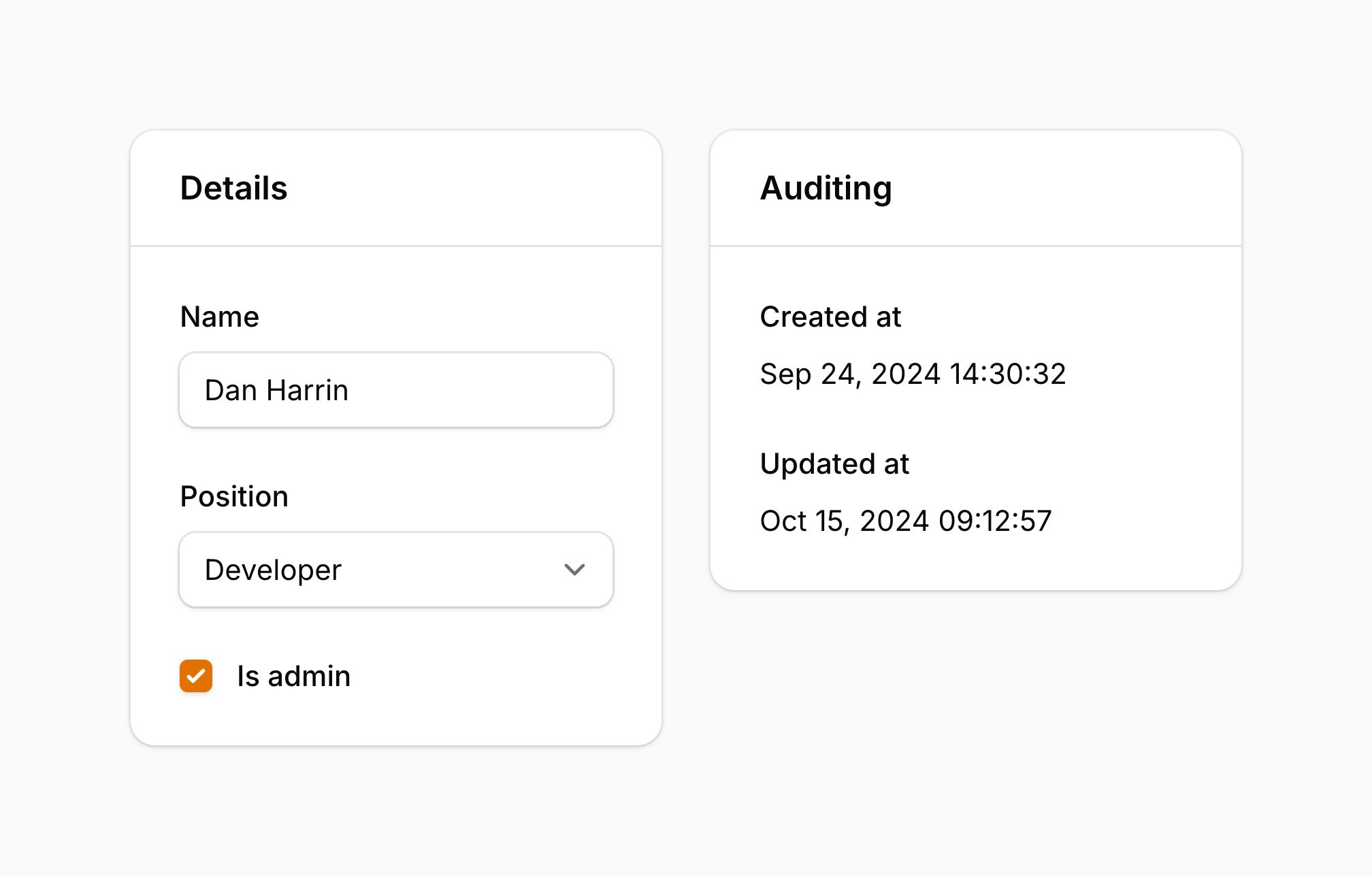
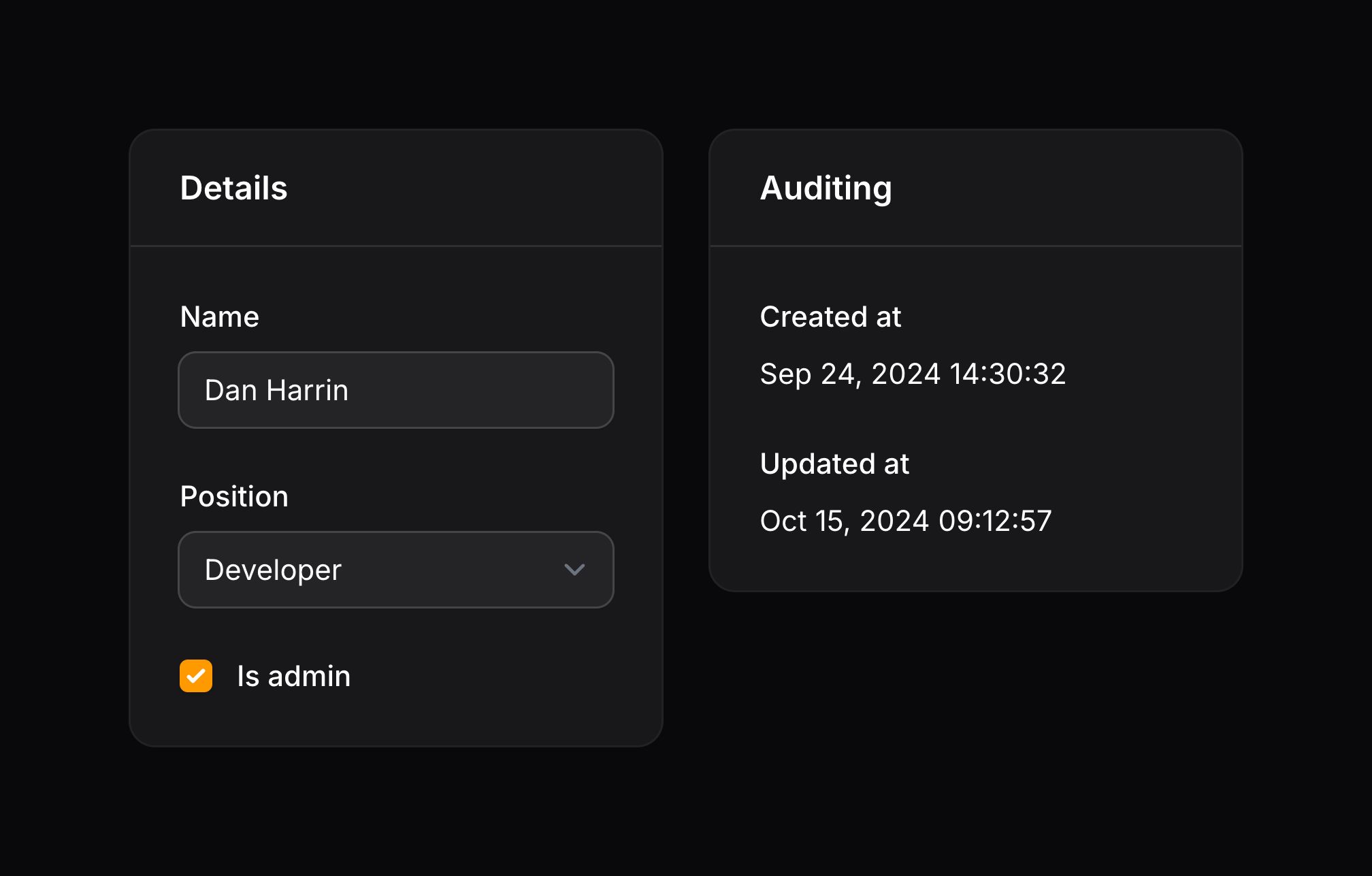
Grid 是一个布局组件,它将多个组件一起渲染成一个响应式网格。网格的列数在 make() 方法中指定。schema() 方法用于在网格中嵌套组件。
Section 是另一个布局组件,它将多个组件一起渲染成一个卡片,并在顶部显示标题。
TextInput、Select 和 Checkbox 是用于接受用户输入的表单组件。
TextEntry 是一个显示只读信息的信息列表组件。在本例中,它用于显示记录的创建和更新时间戳。dateTime() 方法用于将时间戳格式化为日期和时间。
Schema 对象是组件的容器,现在可以进行渲染了。渲染模式将以正确的布局渲染其中的所有组件。
组件 utility 注入
用于配置条目的绝大多数方法都接受函数作为参数,而不是硬编码值:
use Filament\Schemas\Components\Grid;
use Filament\Schemas\Components\Section;

Grid::make(fn (): array => [
    'lg' => auth()->user()->isAdmin() ? 4 : 6,
])->schema([
    // ...
])

Section::make()
    ->heading(fn (): string => auth()->user()->isAdmin() ? 'Admin Dashboard' : 'User Dashboard')
    ->schema([
        // ...
    ])
仅凭这一点就解锁了许多自定义可能性。
该包也可以注入许多实用攻击(utility),以作为这些函数内部的参数使用。所有接受函数作为参数的自定义方法都可以注入 utility。
这些注入的 utility 需要使用特定的参数名称。否则,Filament 将不知道该注入什么。
注入另一个组件的状态
你也可以使用 $get 参数从回调中检索表单字段或信息列表条目的状态(值):
use Filament\Schemas\Components\Utilities\Get;

function (Get $get) {
    $email = $get('email'); // Store the value of the `email` entry in the `$email` variable.
    //...
}
TIP
除非表单字段是响应式的,否则当字段值发生变化时,Schema 不会刷新,只有在下一次用户交互(即向服务器发出请求)时才会刷新。如果需要对字段值的变化做出响应,则应该使用 live()。
注入当前 Eloquent 记录
使用 $record 参数,你可以检索当前 Schema 的 Eloquent 记录:
use Illuminate\Database\Eloquent\Model;

function (?Model $record) {
    // ...
}
注入当前操作
如果你为面板资源或者关联管理器编写 Schema,并且想要检测该 Schema 是 create、edit 或者 view,请使用 $operation 参数:
function (string $operation) {
    // ...
}
NOTE
使用 $schema->operation() 方法,你可以手动设置 Schema 的操作。
注入当前 Livewire 组件实例
如果你想访问当前 Livewire 组件实例,请定义 $livewire 参数:
use Livewire\Component;

function (Component $livewire) {
    // ...
}
注入当前组件实例
如果你想访问当前组件实例,请定义 $component 参数:
use Filament\Schemas\Components\Component;

function (Component $component) {
    // ...
}
注入多个 utility
参数是使用反射动态注入的,因此你可以按任意顺序组合多个参数:
use Filament\Schemas\Components\Utilities\Get;
use Filament\Schemas\Components\Utilities\Set;
use Livewire\Component as Livewire;

function (Livewire $livewire, Get $get, Set $set) {
    // ...
}
注入 Laravel 容器依赖
你可以像平常一样从 Laravel 的容器中注入任何东西,以及 utility:
use Filament\Schemas\Components\Utilities\Set;
use Illuminate\Http\Request;

function (Request $request, Set $set) {
    // ...
}
Deferring the loading of a child schema
By default, a schema’s components are rendered when the page loads. If a child schema is expensive to render, you can defer its loading until it enters the viewport using the deferLoading() method:
use Filament\Forms\Components\TextInput;
use Filament\Schemas\Components\Section;
use Filament\Schemas\Schema;

Section::make('Customer details')
    ->key('customerDetails')
    ->schema(
        Schema::make()
            ->components([
                TextInput::make('name'),
                TextInput::make('email')
                    ->email(),
            ])
            ->deferLoading(),
    )
The deferred schema initially renders a loading indicator. When the loading indicator enters the viewport, only that schema is rendered in a new request. If the schema contains a validation error before it has loaded, it is loaded automatically so the validation error can be revealed.
If a deferred schema is inside a concealed component, such as a collapsed section or an inactive tab, it will not load until its parent is revealed and it enters the viewport. Once a schema has loaded, it remains loaded for the lifetime of the Livewire component.
Every deferred schema needs a unique key. In this example, the child schema inherits the customerDetails key from the section. You can instead call key() on the child schema itself. If multiple child schemas of the same component are deferred, such as a section’s content and footer schemas, you must call key() on each additional schema so that they do not inherit the same key. If you defer the schema for a repeater item or builder block, each item schema automatically receives a unique key from its state path:
use Filament\Forms\Components\Repeater;
use Filament\Forms\Components\TextInput;
use Filament\Schemas\Schema;

Repeater::make('members')
    ->schema(
        Schema::make()
            ->components([
                TextInput::make('name'),
                TextInput::make('email')
                    ->email(),
            ])
            ->deferLoading(),
    )
You may also pass a boolean or function to deferLoading() to control it conditionally.
全局设置
如果你希望全局更改组件的默认行为,则可以在服务提供者的 boot() 方法中调用静态的 configureUsing() 方法,并向该方法传递一个闭包来修改组件的使用方式。例如,如果你希望使所有部分组件默认具有 2 列,你可以这样做:
use Filament\Schemas\Components\Section;

Section::configureUsing(function (Section $section): void {
    $section
        ->columns(2);
});
当然,你仍然可以在每个组件中单独重写此方法:
use Filament\Schemas\Components\Section;

Section::make()
    ->columns(1)
Restricting Livewire file uploads to schema components
If you build a custom Livewire component on top of InteractsWithSchemas, Livewire’s file upload RPC methods accept uploads to any property path by default. See Restricting Livewire file uploads to schema components in the security documentation for the RestrictsFileUploadsToSchemaComponents trait that locks them down.
Still need help? Join our Discord community or open a GitHub discussion