
表单
验证
简介
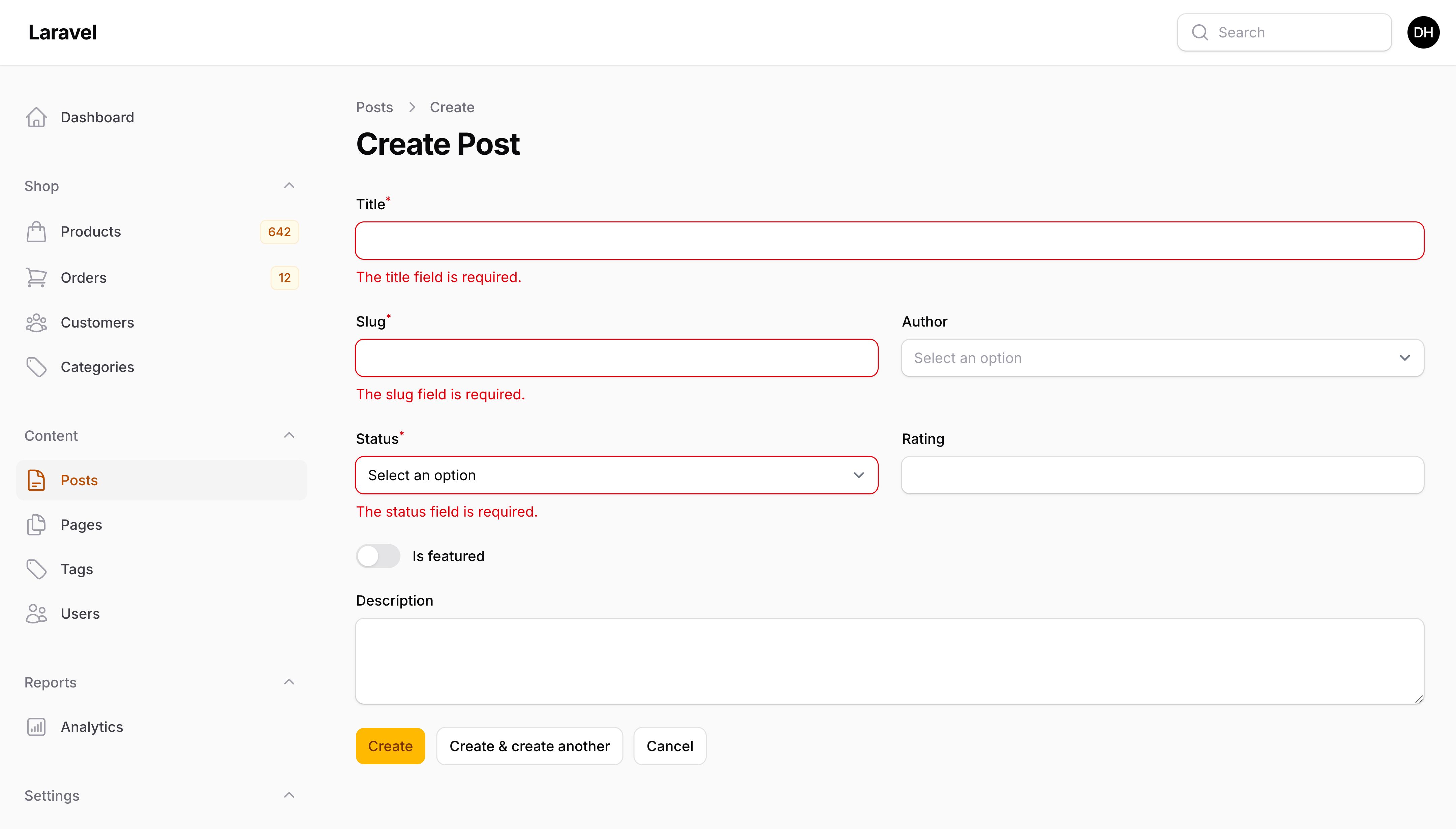
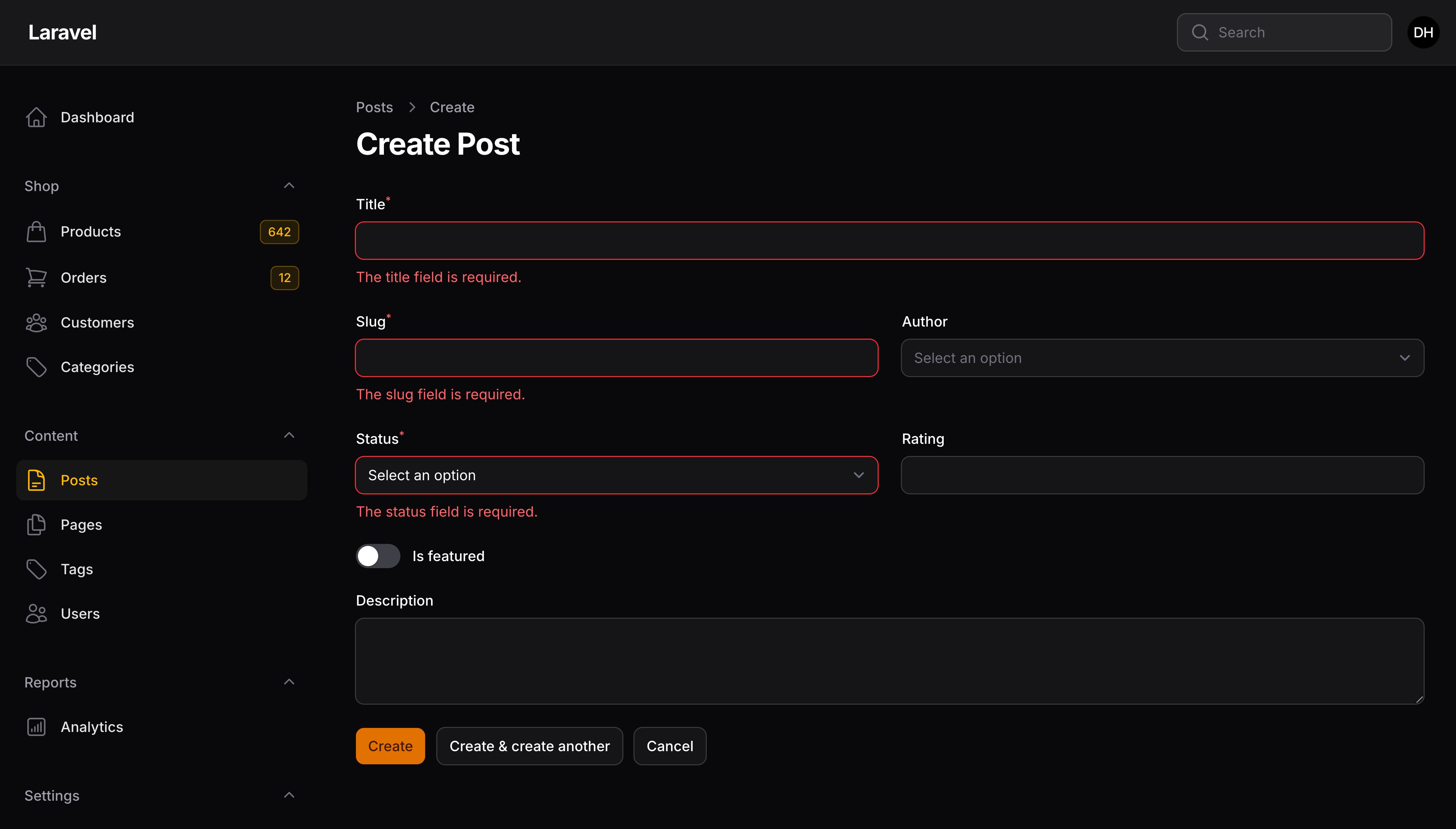
可以将验证规则添加到任何字段。
在 Laravel 中,验证规则通常以数组方式(如 ['required', 'max:255'])或组合字符串方式定义,例如 required|max:255。如果你只在后端处理简单的表单请求,这没有问题。但 Filament 同时也为你的用户提供前端验证,以便他们在发出任何后端请求之前修复错误。
Filament 包含许多专用验证方法,但你也可以使用任何其他 Laravel 验证规则,包括自定义验证规则。
NOTE
部分默认 Laravel 验证规则依赖于正确的属性名称,通过 rule()/rules() 传递时无效。请尽可能使用专用的验证方法。
可用规则
Active URL
根据 PHP 字段值必须经过 PHP 函数 dns_get_record() 验证返回有效的 A 或 AAAA 记录。(即具有 A 记录的网址)请参阅 Laravel 文档。
Field::make('name')->activeUrl()
After (date)
字段值必须在给定日期之后。请参阅 Laravel 文档。
Field::make('start_date')->after('tomorrow')
另外,你也可以传入其他字段名作比较:
Field::make('start_date')
Field::make('end_date')->after('start_date')
After or equal to (date)
字段值必须晚于或者等于给定日期。请参阅 Laravel 文档。
Field::make('start_date')->afterOrEqual('tomorrow')
另外,你也可以传入其他字段名作比较:
Field::make('start_date')
Field::make('end_date')->afterOrEqual('start_date')
Alpha
字段值必须全部由英文字母组成。参考 Laravel 文档
Field::make('name')->alpha()
Alpha Dash
字段值可以包含英文字母、数字、中横线(-)或下划线(_)。参考 Laravel 文档
Field::make('name')->alphaDash()
Alpha Numeric
字段值必须是英文字母或数字组成。参考 Laravel 文档
Field::make('name')->alphaNum()
ASCII
字段值必须是 7 位 ASCII 字符。参考 Laravel 文档
Field::make('name')->ascii()
Before (date)
字段值必须在给定日期之前。参考 Laravel 文档
Field::make('start_date')->before('first day of next month')
另外,你也可以传入其他字段名作比较:
Field::make('start_date')->before('end_date')
Field::make('end_date')
Before or equal to (date)
字段值必须早于或者等于给定日期。参考 Laravel 文档
Field::make('start_date')->beforeOrEqual('end of this month')
另外,你可以传入其他字段名用作比较:
Field::make('start_date')->beforeOrEqual('end_date')
Field::make('end_date')
Confirmed
字段值必须与字段 {field}_confirmation 匹配。参考 Laravel 文档
Field::make('password')->confirmed()
Field::make('password_confirmation')
Different
字段值必须与另一个字段的值不同。参考 Laravel 文档
Field::make('backup_email')->different('email')
Doesnt Start With
字段值不能以给定的值开头。参考 Laravel 文档
Field::make('name')->doesntStartWith(['admin'])
Doesnt End With
字段值不能以给定的其中一个值结尾。 参考 Laravel 文档
Field::make('name')->doesntEndWith(['admin'])
Ends With
字段值必须以给定的其中一个值开头。参考 Laravel 文档
Field::make('name')->endsWith(['bot'])
Enum
字段必须包含一个有效的 Enum 值。参考 Laravel 文档
Field::make('status')->enum(MyStatus::class)
Exists
字段值必须在数据库中存在。参考 Laravel 文档
Field::make('invitation')->exists()
默认情况下,如果表单注册了模型,就会搜索表单模型。你也可以指定一个用以搜索的自定义的表格名或者模型:
use App\Models\Invitation;

Field::make('invitation')->exists(table: Invitation::class)
默认情况下,表单字段名会被用作搜索字段。你也可以指定一个自定义搜索字段:
Field::make('invitation')->exists(column: 'id')
你可以传入闭包到 modifyRuleUsing 参数中,进一步自定义规则:
use Illuminate\Validation\Rules\Exists;

Field::make('invitation')
    ->exists(modifyRuleUsing: function (Exists $rule) {
        return $rule->where('is_active', 1);
    })
Laravel 的 exists 验证规则默认不使用 Eloquent 模型查询数据库,因此它不会在模型中定义任何全局查询作用域,包括软删除。因此,即使存在具有相同值的软删除记录,验证也会通过。
由于不应用全局查询范围限定,Filament 的多租户功能默认也不会将查询范围限定到当前租户。
为此,你应该使用 scopedExists() 方法,该方法将 Laravel 的 exists 实现替换为使用模型查询数据库的实现,并应用模型中定义的任何全局查询作用域,包括软删除和多租户:
use Filament\Forms\Components\TextInput;

TextInput::make('email')
    ->scopedExists()
如果你想要修改用于检查存在性的 Eloquent 查询,包括删除全局范围限定,你可以传入一个函数到 modifyQueryUsing 参数:
use Filament\Forms\Components\TextInput;
use Illuminate\Database\Eloquent\Builder;
use Illuminate\Database\Eloquent\SoftDeletingScope;

TextInput::make('email')
    ->scopedExists(modifyQueryUsing: function (Builder $query) {
        return $query->withoutGlobalScope(SoftDeletingScope::class);
    })
Filled
当字段存在时,字段值不能为空。参考 Laravel 文档
Field::make('name')->filled()
Greater than
验证的字段值必须比另一个字段的值大。参考 Laravel 文档
Field::make('newNumber')->gt('oldNumber')
Greater than or equal to
验证的字段值必须大于或等于给定字段的值。参考 Laravel 文档
Field::make('newNumber')->gte('oldNumber')
Hex color
字段值必需是有效的 16 进制格式的颜色。参考 Laravel 文档
Field::make('color')->hexColor()
In
验证字段必须包含在给定的值列表中。参考 Laravel 文档
Field::make('status')->in(['pending', 'completed'])
The toggle buttons, checkbox list, radio and select fields automatically apply the in() rule based on their available options, so you do not need to add it manually.
Ip Address
字段值必须是 IP 地址。参考 Laravel 文档
Field::make('ip_address')->ip()
Field::make('ip_address')->ipv4()
Field::make('ip_address')->ipv6()
JSON
字段值必须是有效的 JSON 字符串。参考 Laravel 文档
Field::make('ip_address')->json()
Less than
验证的字段值必须比另一个字段的值小。参考 Laravel 文档
Field::make('newNumber')->lt('oldNumber')
Less than or equal to
验证的字段值必须小于或等于给定字段的值。参考 Laravel 文档
Field::make('newNumber')->lte('oldNumber')
Mac Address
字段值必须是 MAC 地址。参考 Laravel 文档
Field::make('mac_address')->macAddress()
Multiple Of
字段值必须是给定值的倍数。参考 Laravel 文档
Field::make('number')->multipleOf(2)
Not In
验证字段不包含在给定的值列表中 参考 Laravel 文档
Field::make('status')->notIn(['cancelled', 'rejected'])
Not Regex
字段值必须不匹配给定的正则表达式。参考 Laravel 文档
Field::make('email')->notRegex('/^.+$/i')
Nullable
字段值可以为空。如果没有使用 required 规则,这个规则会被默认使用。参考 Laravel 文档
Field::make('name')->nullable()
Prohibited
字段值必须是空。参考 Laravel 文档
Field::make('name')->prohibited()
Prohibited If
只要其他指定字段有任何给定值,该字段就必须为空。参考 Laravel 文档
Field::make('name')->prohibitedIf('field', 'value')
Prohibited Unless
除非其他指定字段有任何给定值,否则给字段必须为空。参考 Laravel 文档
Field::make('name')->prohibitedUnless('field', 'value')
Prohibits
如果该字段不为空,所有其他指定字段必须为空。参考 Laravel 文档
Field::make('name')->prohibits('field')

Field::make('name')->prohibits(['field', 'another_field'])
Required
字段值不能为空。参考 Laravel 文档
Field::make('name')->required()
将字段标记为必填项
默认情况下,必填字段会在标签旁边显示星号“*”。你可能希望在所有字段均为必填项的表单中隐藏星号,或者在可选字段旁边添加提示:
use Filament\Forms\Components\TextInput;

TextInput::make('name')
    ->required() // Adds validation to ensure the field is required
    ->markAsRequired(false) // Removes the asterisk
如果你的字段不是 required(),但仍希望显示星号 *,你也可以使用 markAsRequired():
use Filament\Forms\Components\TextInput;

TextInput::make('name')
    ->markAsRequired()
Required If
只有在指定字段有给定值时,该字段才不能为空。参考 Laravel 文档。
Field::make('name')->requiredIf('field', 'value')
Required If Accepted
只有在其他指定字段等于 “yes”、“on”、 1、 “1”、 true 或 “true” 时,该字段才不能为空。参考 Laravel 文档
Field::make('name')->requiredIfAccepted('field')
Required Unless
字段值不能为空,_除非_其他指定字段有给定值。参考 Laravel 文档。
Field::make('name')->requiredUnless('field', 'value')
Required With
只要其他指定的任一字段不为空时,该字段不能为空。参考 Laravel 文档
Field::make('name')->requiredWith('field,another_field')
Required With All
只有当其他指定的字段都不为空时,该字段不能为空。参考 Laravel 文档
Field::make('name')->requiredWithAll('field,another_field')
Required Without
只有当其他指定的任一字段为空时,该字段不能为空。参考 Laravel 文档
Field::make('name')->requiredWithout('field,another_field')
Required Without All
只有当其他指定的字段都为空时,该字段不能为空。参考 Laravel 文档
Field::make('name')->requiredWithoutAll('field,another_field')
Regex
字段值必须匹配给定的正则表达式。参考 Laravel 文档
Field::make('email')->regex('/^.+@.+$/i')
Same
字段值必须与另一个给定字段的值相同。参考 Laravel 文档
Field::make('password')->same('passwordConfirmation')
Starts With
字段值必须以其中一个给定值开始。参考 Laravel 文档
Field::make('name')->startsWith(['a'])
String
字段值必须是字符串。参考 Laravel 文档
Field::make('name')->string()
Unique
字段值必须在数据库中不存在。参考 Laravel 文档
Field::make('email')->unique()
如果你的 Filament 表单已经有关联的 Eloquent 模型,比如在面板资源中的模型。Filament 将使用该模型。你也可用指定自定义的表名或者模型,用以搜索:
use App\Models\User;

Field::make('email')->unique(table: User::class)
默认情况下,该字段名将用作要搜索的列。你也可用指定用以搜索的自定义列字段:
Field::make('email')->unique(column: 'email_address')
有时,你想在唯一性(unique)验证时忽略某个给定的模型。比如,“更新个人资料”表单包含了名字、邮箱和地址。你可能会要验证邮箱地址是否唯一。不过,如果用户只修改了名字并未修改邮箱字段,你并不希望因为用户的邮箱地址已经存在而抛出验证错误。如果你的 Filament 表单已经关联了 Eloquent 模型,例如,表单在面板资源中,Filament 将忽略它。
为了防止 Filament 忽略当前的 Eloquent 记录,你可以将 false 传递给 ignoreRecord 参数:
Field::make('email')->unique(ignoreRecord: false)
或者,如果你要忽略某个特定的 Eloquent 记录,你可以将其传递给 ignorable 参数:
Field::make('email')->unique(ignorable: $ignoredUser)
通过传递闭包给 modifyRuleUsing 参数,你可以进一步自定义规则:
use Illuminate\Validation\Rules\Unique;

Field::make('email')
    ->unique(modifyRuleUsing: function (Unique $rule) {
        return $rule->where('is_active', 1);
    })
Laravel 的 unique 默认不使用 Eloquent 模型查询数据库(而是直接查询数据库),因此也不会使用定义在模型上的全局查询作用域,包括软删除。比如,即使已经软删除的记录也有同样的值,该验证也会失败。
由于未使用全局查询作用域,Filament 的多租户特性默认页不会限定当前租户的查询范围。
如果你想使用查询范围限定,你应该使用 scopedUnique() 方法,它将替换 Laravel 的 unique 实现,使用模型、并适用定义在该模型上的任何全局查询范围来查询数据库,包含软删除和多租户:
use Filament\Forms\Components\TextInput;

TextInput::make('email')
    ->scopedUnique()
如果你想修改用于检测唯一性的 Eloquent 查询,包括移除全局查询范围限定,你可以传递一个函数到 modifyQueryUsing 参数:
use Filament\Forms\Components\TextInput;
use Illuminate\Database\Eloquent\Builder;
use Illuminate\Database\Eloquent\SoftDeletingScope;

TextInput::make('email')
    ->scopedUnique(modifyQueryUsing: function (Builder $query) {
        return $query->withoutGlobalScope(SoftDeletingScope::class);
    })
ULID
自断必须是一个有效的通用唯一词典可排序标识符(Universally Unique Lexicographically Sortable Identifier) (ULID). 参考 Laravel 文档。
Field::make('identifier')->ulid()
UUID
字段必须是有效的 RFC 4122(版本 1、3、4 或 5) UUID。参考 Laravel 文档
Field::make('identifier')->uuid()
其他规则
你可以使用 rules() 方法添加其他验证规则:
TextInput::make('slug')->rules(['alpha_dash'])
验证规则的完整清单可以在 Laravel 文档中查看。
自定义规则
你可以使用任何自定义规则,正如在 Laravel 中使用的自定义规则一样:
TextInput::make('slug')->rules([new Uppercase()])
你也可以使用闭包规则
use Closure;

TextInput::make('slug')->rules([
    fn (): Closure => function (string $attribute, $value, Closure $fail) {
        if ($value === 'foo') {
            $fail('The :attribute is invalid.');
        }
    },
])
你也可以注入 utilities(比如,$get)到自定义规则,比如你需要在表单中用到其他字段。要实现此功能,你可以该闭包包裹在另一个返回它的函数中:
use Filament\Schemas\Components\Utilities\Get;

TextInput::make('slug')->rules([
    fn (Get $get): Closure => function (string $attribute, $value, Closure $fail) use ($get) {
        if ($get('other_field') === 'foo' && $value !== 'bar') {
            $fail("The {$attribute} is invalid.");
        }
    },
])
自定义验证属性
如果字段验证失败,错误消息中会引用标签名。你可以使用 validationAttribute() 方法,自定义错误消息使用的标签名:
use Filament\Forms\Components\TextInput;

TextInput::make('name')
    ->validationAttribute('full name')
除了允许静态值,validationAttribute() 方法也接受函数以动态计算其值。你可以将多个 utility 作为参数注入到该函数中。
了解更多 utility 注入详情。 | Utility | 类型 | 参数 | 描述 |
|---|---|---|---|
| Field | Filament\Forms\Components\Field | $component | The current field component instance. |
| Get function | Filament\Schemas\Components\Utilities\Get | $get | A function for retrieving values from the current form data. Validation is not run. |
| Livewire | Livewire\Component | $livewire | The Livewire component instance. |
| Eloquent model FQN | ?string<Illuminate\Database\Eloquent\Model> | $model | The Eloquent model FQN for the current schema. |
| Operation | string | $operation | The current operation being performed by the schema. Usually create, edit, or view. |
| Raw state | mixed | $rawState | The current value of the field, before state casts were applied. Validation is not run. |
| Eloquent record | ?Illuminate\Database\Eloquent\Model | $record | The Eloquent record for the current schema. |
| State | mixed | $state | The current value of the field. Validation is not run. |
验证消息
默认使用了 Laravel 的验证错误消息。要自定义错误消息,请使用 validationMessages() 方法:
use Filament\Forms\Components\TextInput;

TextInput::make('email')
    ->unique(// ...)
    ->validationMessages([
        'unique' => 'The :attribute has already been registered.',
    ])
除了允许静态值数组,validationMessages() 方法也接受函数以动态计算该值。你可以将多个 utility 作为参数注入到该函数中。
了解更多 utility 注入详情。 | Utility | 类型 | 参数 | 描述 |
|---|---|---|---|
| Field | Filament\Forms\Components\Field | $component | The current field component instance. |
| Get function | Filament\Schemas\Components\Utilities\Get | $get | A function for retrieving values from the current form data. Validation is not run. |
| Livewire | Livewire\Component | $livewire | The Livewire component instance. |
| Eloquent model FQN | ?string<Illuminate\Database\Eloquent\Model> | $model | The Eloquent model FQN for the current schema. |
| Operation | string | $operation | The current operation being performed by the schema. Usually create, edit, or view. |
| Raw state | mixed | $rawState | The current value of the field, before state casts were applied. Validation is not run. |
| Eloquent record | ?Illuminate\Database\Eloquent\Model | $record | The Eloquent record for the current schema. |
| State | mixed | $state | The current value of the field. Validation is not run. |
在验证消息中允许 HTML
默认情况下,验证消息会被渲染成普通文本,以防止 XSS 攻击。不过,有时你可能需要在验证消息中渲染 HTML 内容,比如展示列表或者链接。要让验证消息启用 HTML 渲染,请使用 allowHtmlValidationMessages() 方法:
use Filament\Forms\Components\TextInput;

TextInput::make('password')
    ->required()
    ->rules([
        new CustomRule(), // Custom rule that returns a validation message that contains HTML
    ])
    ->allowHtmlValidationMessages()
NOTE
请注意,你需要确保所有验证消息中渲染的 HTML 是安全的,否则应用可能会有 XSS 攻击漏洞。
当字段未被保存时禁用验证
当字段未被保存时,它仍然是有效的。要禁用未脱水的字段的验证,请使用 validatedWhenNotDehydrated():
use Filament\Forms\Components\TextInput;

TextInput::make('name')
    ->required()
    ->dehydrated(false)
    ->validatedWhenNotDehydrated(false)
除了允许静态值数组之外,validatedWhenNotDehydrated() 方法也接受函数以动态计算该值。你可以将多个 utility 作为参数注入到该函数中。
了解更多 utility 注入详情。 | Utility | 类型 | 参数 | 描述 |
|---|---|---|---|
| Field | Filament\Forms\Components\Field | $component | The current field component instance. |
| Get function | Filament\Schemas\Components\Utilities\Get | $get | A function for retrieving values from the current form data. Validation is not run. |
| Livewire | Livewire\Component | $livewire | The Livewire component instance. |
| Eloquent model FQN | ?string<Illuminate\Database\Eloquent\Model> | $model | The Eloquent model FQN for the current schema. |
| Operation | string | $operation | The current operation being performed by the schema. Usually create, edit, or view. |
| Raw state | mixed | $rawState | The current value of the field, before state casts were applied. Validation is not run. |
| Eloquent record | ?Illuminate\Database\Eloquent\Model | $record | The Eloquent record for the current schema. |
| State | mixed | $state | The current value of the field. Validation is not run. |
Still need help? Join our Discord community or open a GitHub discussion